
We hear a recurring thread that AI isn’t necessarily improving productivity, but it is helping people cope when under pressure. I’ve been reflecting a lot on this from a personal perspective – over the last few months, I’ve been under additional pressure as my team has been down on numbers for various reasons, some good, some less so. AI, of course, hasn’t been the full solution – prioritising, sharing workload more effectively, and so on have all been part of the toolkit.
I thought I’d take a little time to reflect on some of the ways I’ve deliberately leaned into AI as a coping mechanism, and particularly whether it’s meant I’ve been tempted to create ‘Workslop’. (Workslop Definition: AI‑generated work that looks polished but lacks substance or doesn’t actually advance the task)
My honest reflection is
- It genuinely has helped me cope without simply shifting the pressure elsewhere (e.g. over delegating tasks to others and just shifting the pressure from me to them)
- I’ve probably avoided creating Workslop just because I’m so aware of it.
In a small number of cases, what I’ve ended up with is both better and more efficient. In others, it’s perhaps shown that the process itself is probably the issue.
I’ve got these examples by trawling through my chat history in ChatGPT, Claude and Copilot. I’ve omitted most proofreading, feedback and information-searching examples, although these are by far my most common use cases, and instead picked ones where I’ve semi-automated a process or task.
Let’s start with one of the most positive examples.
Quarterly Reviews Form
We have a quarterly staff review process, and I’m 100% behind the idea of setting aside quality time to talk to my team members, for me and them to reflect, and so on.
The personal pressure issue this time was this: with my colleague being off, the number of reviews I had to do doubled to around 12, which in the old way meant about a solid week, including planning, the reviews, and writing them up, and I couldn’t see how I could physically do it. I didn’t want to compromise on the time I spent in the conversation.
So I extended an approach I tried with a couple of people last time, which was initially intended to provide a flow that was more structured on what worked best for individuals, but also had the benefit of time saving.
For context, the way the software works means people need to fill in 8 or 9 different text boxes reflecting on different areas, each typically a paragraph or two, often with a lot of overlap. The manager then has to do the same. As with many such processes, the challenge is to make software which perhaps pushes us to a one-size-fits-all work well for everyone. Using AI tools, we have the opportunity to take a more personalised approach.
In the AI-assisted process, the team member has a choice of completing the form before we chat or after, depending on whether they feel it helps them reflect. We then have the review, and this time, rather than talking about a form which they may have completed in a way that didn’t necessarily play to their strengths, we focus on the conversations about each of the areas, with transcription enabled. I then have two Copilot agents, one to produce the text on both sides of the form (mine and the team member’s) and one just for mine if they completed the form. I feed the agent the transcript and the form, and it creates all the notes. We still have to paste them in (our HR software is coded in a non-machine-friendly way, with the form as some sort of HTML overlay), but that gives us a natural ‘human-in-the-loop’ point to check the AI process hasn’t lost anything and is accurate.
The result? For me at least, a much better review conversation, based around what really works and matters for the individual, and a much, much better record, especially on my side, as I just can’t take notes and talk at the same time. And time on the admin probably dropped by 90%. And as a bonus, I actually managed to fit all the reviews in – a task which, looking at my calendar, initially felt almost impossible.
Recruitment form
We have a Word form that we need to complete if we want to recruit an apprentice. Not the worst Word form in the world – i.e. it’s not made of boxes and tables, but about 5 questions, around 1000 words to complete. Roughly, it’s: what does your team do, what’s the apprenticeship, what will they do, what will they learn, how much does it cost? All reasonable questions, but all just moving information from one place to another. The apprenticeship spec is already online, and the Jisc website and blogs describe what we do. The deadline for this meant doing it manually was pretty difficult, as I was travelling all week, and my colleague, who would normally do this, is away. This time I used Copilot and Claude (we have the secure team versions). Copilot: I just gave it the form, the URL of the spec, and said, ‘can you complete this form for me’. I gave it a once-over – it was pretty good, but not quite there, so I did one of my favourite workflows, and gave it to Claude and told it ChatGPT did it: could it make it better? Nothing seems to focus an LLM like this!
Claude’s response:
“Analyzed ChatGPT version, identified weaknesses, drafted substantially improved content”
In particular, it noticed this
“The ChatGPT version is fluent but generic — lots of AI-flavoured filler”.
It revised it. A quick read-through and this version was perfect – better than if I’d done it myself, and not Workslop filler (Claude removed this).
A reflection though. Was this genuinely a time-saver or is it a process issue?
For me, it was undoubtedly a time saver – if I wasn’t so pushed and had a fixed deadline, I would almost certainly have done this manually, but the end result is basically the same using AI tools, and I saved myself from having to try and manually write this on a very bouncy and crowded train (my other option to meet the deadline).
I’m not sure, without speaking to the people who read the form, whether this is really a process issue. How much value does transferring the same information into the form actually add? Would a short email saying, “We’d like to recruit an apprentice to expand our AI automation work, and here’s the apprenticeship spec (link to URL),” have achieved the same result?
Proposal Form
Another Word form, and again thankfully not in tables. This one was about taking some work we already do, which is well-documented, and applying it to another sector. This time, I got Copilot in Word to do it for me. I just gave it the proposal for a different customer and said “use this as the basis for an offering to xxxx in the form that is open”.
You might think that doesn’t give it enough to go on, but the form gives the context. Copilot 365 now actually edits the form directly. The first draft was good – Workslop free, and with some minor edits, ready to share with a colleague.
The downside – I think I forgot to share it with the colleague that needed it (I was on a train at the time). So AI – not the solution to everything until I have an agent that picks up these sorts of slips and reminds me. Perfectly plausible in the next few months/years, I think.
Weekly report
When I write this, it’s going to sound a bit insane, but work life is full of these. Each week, I submit a report on what we have done and what we’ll be doing. It’s just bullet points, used to share details up the chain. I actually think it could be automated, as the team largely look across their calendars to remind them and just adds it to the form. The bit that sounds odd is that I then have to add a shorter version to another form last thing on a Friday.
For this one, I just use a pinned conversation in Copilot. I point it at the longer form, have a running prompt that produces the short bullet version, and then I paste the short version into one form, and copy the other one into the right folder.
The copying could, I guess, be automated, but actually it’s the ‘human in the loop’ section where I check the detail.
So, again, no Workslop, halves the time. Is it actually useful, though? I guess it is, but the ideal endgame is probably either full automation, or a shift so AI is changing the format of the content at the point of consumption rather than creation.
Bio
I speak at a lot of events. They always ask for a photo, a bio and a session title/description. You’d think the bio would be completely reusable, but the problem is the length of the bio requested is rarely the same – anything from ‘a sentence or two’ to ‘a detailed page’. I use ChatGPT a lot. Its memory has a good description of what I do, and previous chats include other bio requests. Again, I wonder if I’m the only one who prompts like this:
“hmmm – i’ve been asked for a half-page bio.”
In reality, the ‘hmmm’ is conveying ‘I’m in a rush, I’ve done this before, just get on and do it’.
The result was fine – a very minor tweak needed, just the right length. Time saved, probably not loads, but it reduced distraction, which, at the moment, is hugely valuable for me.
And the ambitious one – Slide sorting
We do a lot of presentations. All our slide decks sit in a folder on SharePoint. Presentations are always customised for the event, but obviously use a lot of existing content. We used to maintain a master deck with all the slides, but it got too big, file-size-wise, for PowerPoint to open.
A Friday afternoon, and I had to create a new deck in a rush, as I’d been picking up more sessions with colleagues being away. Energy was low, and I wasn’t up for looking for the slides I wanted but couldn’t remember where. Rabbit hole time, I decide to see if Claude Cowork can help me. It often defaults to coding as a solution, so that’s what I expect. I ask this:
“I want to see if you can somehow categorise our presentations. I want to do this on a per-slide basis. ie the problem i want to solve is that we put presentations together from others but have to hunt through them.”
To cut a long story short, after a few iterations, I end up with a local web app that lets me explore and search my 2000+ slides, and pick the ones I want for my presentation.
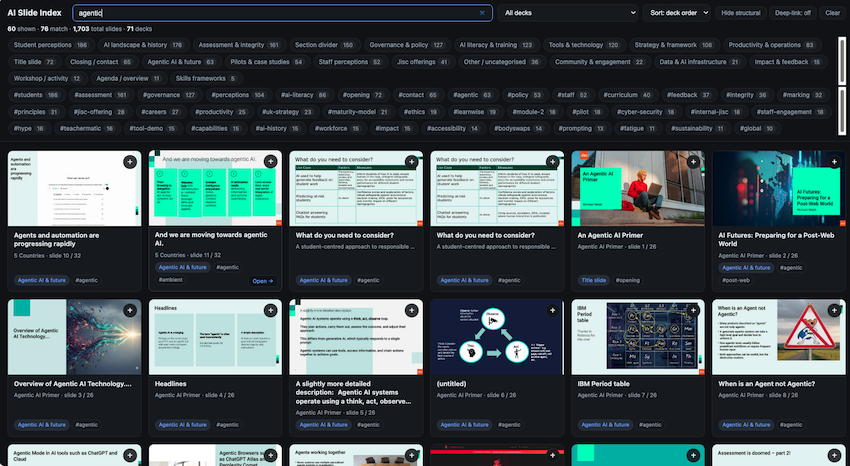
So a brilliant timesaver for me. The immediate question is: can I share it? This is where, I think, a lot of people will fall into a trap. The gap between HTML/JavaScript running locally on my machine just for me, and a scalable, robust, secure, multi-user tool that can run for multiple people on a server, and be maintained etc., is huge, perhaps in ways that only software developers really appreciate. Another way of looking at it – personal productivity is not the same as organisational capability.
The weird one
I got this list by looking through my chats. I found this one, and I can’t remember why!
“add these 173 200 200 77”
What’s going on here? I’d clearly been working on something, had some numbers and needed to add them up. It’s not even that hard – I could do it in my head! Maybe I did and wanted to check. What’s obvious is that when I was in a flow, I must have thought it was quicker to throw it into ChatGPT than pull up a calculator or just double-check my maths. Actually, this seems to be a bit of a common thread that I’m not really conscious of – here’s another, again I can’t remember the context:
“what is £13ph as annual salary”
My guess is I’m almost subconsciously just offloading trivial things to AI when under pressure.
And the fail
I had to complete a consent form for an interview. About 20 tick boxes in Word – each one seems to need me to right-click, navigate a menu, change to ‘ticked’. Just annoying – so in Word I asked Copilot “tick all the boxes”
“I can see the “checkbox” column in your table (the third column) is currently made up of empty cells, but they aren’t actual Word checkbox controls (they’re just blank table cells). Because of that, I can’t “tick” them automatically from here.”
Oh well.
Conclusion
So what’s the conclusion?
A few thoughts:
These examples were textbook examples of using AI to cope, rather than improve productivity. They were all things that I had to do, and using AI reduced the need for longer hours to fill the gap with a reduced team, or simply passing the problem on.
The thread running through many of these examples is that I was shifting information from one place to another. The real goal has to be to stop doing this, and to let the person who wants the information in a particular format simply request it via AI. But our collective information management isn’t yet good enough for that to work.
In one example (the quarterly reviews) – reflecting on what we value from the process and automating the right part is a win-win. But these are probably quite rare.
A number of the examples could have easily resulted in Workslop. I think I’m super-aware of this, and in the recruitment form example, where Copilot generated it (vague, important-sounding phrases), I immediately spotted it and got a different model to remove it. I often do this by hand when reviewing others’ work, but time was short, and this worked.
I hope sharing a few honest examples has been helpful – I’ve often a feeling a few of these fall into the category of uses of AI that we don’t want to admit to or talk about, and partly I just want to open the conversation up a bit to help with the collective discussion about appropriate and non-appropriate uses, as well as AI as catalyst for reflection on process.
And a final note: If I’m under time pressure – why did I spend the time writing over 2000 words about it?! A fair question, and one with a simple answer. I like writing. I find it relaxing; it’s how I work things through. A classic case of trying to use AI responsibly and effectively for the things I like less, so I can spend time doing the things I like and feel add value.
Find out more by visiting our Artificial Intelligence page to explore publications and resources, learn more about our communities and sign up for our AI Literacy training.
For regular updates from the team sign up to our mailing list.
Get in touch with the team directly at AI@jisc.ac.uk