
Executive summary
Over more than 15 years, I’ve had the privilege of working across three universities and two national sector bodies, both in the UK and internationally. This experience has given me a broad perspective on higher education and its many challenges. Yet throughout that time, I have not seen disruption and potential—both positive and negative—emerge as rapidly and profoundly as with generative AI.
At Falmouth, our published institutional position is refreshingly explicit: engaging with AI is a personal choice; we encourage balanced debate based on exploration and critical engagement; and our principles and guidance are “not designed to drive adoption,” nor intended as barriers to innovation—they exist to safeguard staff and students and the integrity of creative work while building AI literacy.
This blog post shares what we did in the Digital Learning Team to translate that stance into practical working habits: a short series of workshops, a month-long pilot in agreed role-specific tasks, and a structured evaluation that produced clear “keep / explore / stop” decisions (labelled throughout as internal pilot results). While the tools mattered, the repeatable method mattered more: principled experimentation, strong review culture, and artifacts that other teams can reuse.
Intro
I do not need to share the flood of AI headlines any of us have seen. What matters is that AI is already present in our professional tools and processes, and the choices we make now will shape staff practice, student experience, and trust in our work for years.
My professional focus has always been on digital leadership—where change is the constant and fear of change is one of the biggest barriers. If people feel AI is happening to them, the result is anxiety, avoidance, or overconfidence. None of those outcomes help students or protect standards. The alternative is to create space for colleagues to explore AI safely and critically, with clear boundaries and an expectation of human accountability.
That is what we set out to do in the Digital Learning Team: not to “adopt AI,” but to build a repeatable way to make good decisions about it—task by task, role by role, and principle by principle.
Why now
The sector context is clear: generative AI is already changing education, creating challenges (including around assessment and academic integrity) but also offering opportunities such as saving staff time and supporting creation of learning materials.
Importantly, sector guidance is moving away from “ban or ignore” and toward capability-building. One widely cited reason is simple: generative AI is likely to become pervasive in the workplace, and education needs to prepare graduates and staff for that reality—authentically and responsibly.
Quality bodies are equally direct that this is not a marginal topic. The sector-facing resources from QAA emphasize that generative AI has far-reaching implications for learning and teaching in higher education, including how higher education is delivered and assessed, and how academic awards may be valued.
At a global level, UNESCO frames the issue as a governance and human-capacity challenge as much as a technology shift: iterative releases are outpacing regulatory adaptation, leaving data privacy risks and institutional readiness gaps. UNESCO’s guidance argues for a human-centered approach, including protection of data privacy and development of human capacity.
For me, these three threads collapse into a single practical conclusion: waiting for “perfect certainty” is not a strategy. The responsible move is structured experimentation, anchored in Falmouth’s published principles, with tight guardrails and evaluation built in from day one.
Guardrails
Falmouth’s published AI position gives us a strong anchor. It explicitly frames AI engagement as personal choice, encourages balanced debate and critical engagement, and recognizes both risks (to creativity, authorship, labour, intellectual property, consent, environmental and societal impacts) and opportunities (experimentation, efficiency, inclusivity, accessibility, innovation).
Most importantly for day-to-day staff practice, the University’s main AI guidance sets out six core principles for staff using generative AI in the workplace: protect confidential and personal information; respect intellectual property and copyright; ensure accuracy and accountability; uphold ethical standards and inclusivity; maintain information security; and be transparent about AI use.
We treated those principles as non-negotiable design requirements for the pilot—not “nice to have” statements. Here is how we translated them into practical guardrails (and the external guidance we used to sharpen our thinking):
Confidentiality, personal data, and fairness – We assumed that AI use can involve personal information risks unless proven otherwise, and we designed task selection to minimize exposure. – The Information Commissioner’s Office is clear that its guidance exists to help organizations adopt AI while protecting people and vulnerable groups, and that fairness considerations are central. That framing shaped our risk appetite and our insistence on careful review and appropriate handling of any personal data.
Accuracy, accountability, and “human in control” – We treated AI outputs as drafts and aids—not authoritative truth. – Microsoft explicitly notes that AI systems can make mistakes and may fabricate content that sounds reasonable but is factually inaccurate, which is precisely why review and verification must be built into practice.
Security boundaries and permissions – Where AI tools touch organizational content, permissioning matters. Microsoft’s documentation explains that Microsoft 365 Copilot can generate responses grounded in organizational data (documents, email, chats, meetings) accessed via Microsoft Graph, and that it “only surfaces” data a user has permissions to view—so governance and access controls are not an IT detail; they are a practical safety mechanism.
Accessibility as a quality baseline – We treated accessibility improvements as a legitimate productivity and quality gain, not an optional add-on. – The UK Government guidance on public sector accessibility requirements explains that accessibility regulations apply to public sector bodies and cover intranet and extranet sites used by disabled employees working in or with the public sector, with an expectation that services are perceivable, operable, understandable, and robust. W3C guidance is explicit that images must have appropriate text alternatives, and that transcripts provide essential access to audio/video content for diverse users (including Deaf and hard of hearing users, and—with descriptive transcripts—people who are Deaf-blind).
These guardrails had a cultural effect: they gave colleagues permission to explore without feeling reckless, because the boundaries were clear and the expectation of professional judgment was explicit.
Method
Our method was intentionally simple, repeatable, and role-centered. It follows the spirit of sector guidance that encourages staff to engage with generative AI directly (to understand capabilities and limits) while making decisions that are authentic and robust.
How the pilot was structured
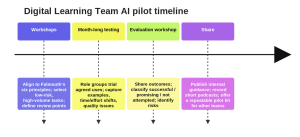
We held a short series of workshops to align on principles and pick tasks; each role group then ran a month-long trial using AI only for agreed, bounded activities; finally, we held an evaluation workshop where findings were shared and categorized as “successful,” “promising,” or “not attempted” (time/priority constraints). All role outcomes reported below are labelled as internal pilot results.
Checklist table for teams who want to replicate the pilot
| Action | Details |
|---|---|
| Start with Falmouth’s six AI principles and agree what they mean in your context | You can state, in plain language, what you will not do (confidentiality, IP, security) and what must always happen (review, transparency). |
| Select 3–6 tasks per role that are frequent, bounded, and reviewable | Tasks are narrow enough that humans can verify outputs quickly, and failures are low-risk. |
| Define “red lines” for personal/confidential data | You have an agreed rule-set that aligns with responsible AI adoption and data protection expectations (especially fairness and protecting vulnerable groups). |
| Build review points into the workflow | No AI output is used without human validation; teams assume potential inaccuracies and check accordingly. |
| Set a time-box (e.g., four weeks) and record examples | You capture representative prompts/outputs, what changed, and what you would not repeat. |
| Evaluate using consistent criteria | Criteria include time saved, quality impact, risk exposure, accessibility impact, and staff confidence. |
| Publish artifacts and share learnings | You produce reusable guidance (internal), short exemplars, and optional podcasts with transcripts. |
Results by role
The headline is not “AI did everything.” The headline is: specific, well-chosen tasks improved—and a disciplined method protected quality while reducing fear. Every achievement listed below is reported as internal pilot results.
Internal pilot results summary table
| Role group | Tasks tested (bounded, role-relevant) | Outcomes (internal pilot results) | Recommended next steps (practitioner-focused) |
|---|---|---|---|
| Learning Technologists | Identified five possible AI applications; trialled time-boxed subset. Included creating helpdesk reports and summarizing long helpdesk email threads. | Successful: helpdesk reports; summarizing long email threads. Promising: one additional idea (further investigation needed). Not attempted: two ideas (time constraints). | Formalize a “helpdesk AI use pattern”: when to summarize, how to verify, and how to store outputs. Prioritize review culture because summaries can omit nuance. |
| Educational Technologists | Used AI alongside the team’s pattern library to draft code/content more rapidly while maintaining standards. | Successful: increased speed of build creation (while keeping the pattern library as the quality anchor). | Document the minimum “definition of done” for AI-assisted builds (review steps, peer review triggers, transparency notes). Link to internal examples/screenshots for reuse. |
| Learning Resource Designers | Explored AI-supported alternative text generation using Ally’s AI Alt Text Assistant. | Successful: accurate, good-quality alt text suggestions, improving efficiency. | Treat AI alt text as suggested draft only; require contextual review before publishing. Build a short internal guide aligned to W3C image text alternative practices. |
| Digital Interns | (1) Converted human-checked captions into transcripts for students. (2) Tested using a bespoke caption style + discipline keywords to improve caption quality. | Successful: captions → transcripts workflow. Promising: discipline/style prompting for better captions (needs further testing). | Standardize transcript publishing and formatting; ensure transcripts meet W3C guidance (and consider descriptive transcripts when needed). Expand testing across disciplines for vocabulary accuracy. |
| Student Advisors | Used AI support for meeting minutes, scanning emails for agenda creation, Level 1 support meeting summaries, and action-focused wrap-ups. | Successful: at least two tasks produced clear benefit (minutes/actions). Promising: other tasks with more iteration and boundary-setting. | Introduce a template: agenda → minutes → actions, with explicit “human review + sensitivity check” step; align use with confidentiality and fairness expectations. |
What the results tell me, analytically
The biggest gains came from summarization and “first-draft structuring,” not fully automated decision-making. This matches how Microsoft positions Copilot’s value in common workflows: summarizing email threads into key points, and summarizing meetings while suggesting action items.
Quality depended on disciplined review, because plausible-sounding errors are a structural risk. Microsoft’s own transparency note is blunt that AI can fabricate or misrepresent content. That is not a reason to panic; it is a reason to engineer review into the method.
Accessibility work is a particularly strong “responsible use case,” when human approval stays central. Ally’s AI Alt Text Assistant is explicitly designed to provide suggestions to make accessibility fixes more efficient, but it is also explicit that it is not guaranteed to make every image accessible with perfect alt text and that instructors must review and approve or adjust output. This aligns directly with W3C’s position that images must have appropriate text alternatives based on purpose.
The method reduced fear because it reduced ambiguity. Falmouth’s published stance legitimizes critical engagement and emphasizes that guidance is about safeguarding and AI literacy—not forcing adoption. When colleagues are given that framing, plus practical boundaries, exploration becomes professional rather than threatening.
Implications & Next Steps
The phrase I have been using internally is: we ain’t never going back—not because we are “all in” on any tool, but because the real shift is cultural. We now have a tested way of working: start from principle, select bounded tasks, test, evaluate, share. That is digital leadership in practice.
Implications for the wider University
If you are in a team asking “Should we use AI?”, I would reframe it to three better questions:
- Which tasks are high-volume and reviewable, where cautious AI assistance could reduce workload without lowering quality?
- What are our guardrails, explicitly anchored to Falmouth’s six principles?
- What evidence will we collect so we can decide ‘keep / explore / stop’—and share it with others?
This aligns with sector expectations that generative AI affects delivery and assessment and must be handled in ways that protect academic standards and trust.
*AI was used in the creation of this guidance for sentence structure and information gathering.
Find out more by visiting our Artificial Intelligence page to explore publications and resources, learn more about our communities and sign up for our AI Literacy training.
For regular updates from the team sign up to our mailing list.
Get in touch with the team directly at AI@jisc.ac.uk