

I’m talking about AI and safeguarding at the AoC Digital Futures conference next week. The subject was suggested by the conference organising team, as it’s coming up a lot in their discussions. I think it’s a good choice, and highly topical – especially with the UK government’s conversations around social media (which is driven by AI algorithms), screen time, and harmful content on phones. Remember, not all AI is generative AI, and AI is part of the problem, the solution, or both, as well as a topic in its own right.
So what’s the best use of my time? I think one of the most helpful things I could do would be to dive a little into the detail, and explain how the technology can or might address the various risks – broadly:
- AI creating or exposing learners to harmful content.
- AI being used by people to harm others.
- Sensitive safeguarding information being mishandled through AI or surrounding systems.
I’m going to work through this in layers, starting with the legal or statutory requirements in the UK, take a brief look at the risks, and then go down to how the technology can or might help.
The AI Concerns
So let’s start with the requirements. In England it’s covered in ‘Keeping Children Safe In Education’ (KCSIE), in Wales ‘Keeping Learners Safe’, in Scotland and Northern Ireland it’s folded into broad frameworks. Forgive my anglocentricity here, but I’m just going to use KCSIE as an example.
KCSIE frames the online risks around what it calls the 4Cs: content, contact, conduct and commerce. My first two risks, AI creating or exposing learners to harmful content and AI being used to harm others, sit squarely within these. My third, the mishandling of sensitive safeguarding information, isn’t really covered by the 4Cs, so I’ll come back to that separately when we get to data loss prevention.
Here’s my take on how the 4Cs look through an AI lens:
| Concern | What KCSIE describes | Potential AI-specific issue |
|---|---|---|
| Content | Being exposed to illegal, inappropriate or harmful content — for example pornography, racism, misogyny, self-harm, suicide, antisemitism, radicalisation, extremism, misinformation, disinformation (including fake news) and conspiracy theories. | Generative AI can create harmful material on demand, including deepfake pornography, hate speech and self-harm or suicide instructions – often bypassing the filters that block such content on traditional sites.
AI “hallucinations” present false information as fact, and AI tools can mass-produce convincing misinformation, disinformation and deepfakes at scale. Recommender algorithms can push users toward increasingly extreme or radicalising content, accelerating exposure. |
| Contact | Being subjected to harmful online interaction with other users — for example peer-to-peer pressure, commercial advertising, and adults posing as children or young adults with the intention to groom or exploit them for sexual, criminal, financial or other purposes. | AI chatbots and “companion” apps can pose as peers or trusted adults, building relationships that blur the line between human and machine and can foster unhealthy dependency.
Offenders can use AI to automate and scale grooming, generating believable personas, translating messages and sustaining many conversations at once. Voice- and video-cloning deepfakes enable convincing impersonation of friends, family or staff to manipulate or coerce. |
| Conduct | Online behaviour that increases the likelihood of, or causes, harm — for example making, sending and receiving explicit images (consensual and non-consensual sharing of nudes and semi-nudes and/or pornography), sharing other explicit images, and online bullying. | “Nudify” and deepfake apps let pupils generate fake nude or explicit images of peers from ordinary photos — creating child sexual abuse material and a powerful new tool for bullying and harassment.
AI lowers the skill and effort needed to produce and spread such content, increasing both the volume and the realism of harmful images. Pupils may not realise that creating or sharing AI-generated explicit images of under-18s is a criminal offence. |
| Commerce | Risks such as online gambling, inappropriate advertising, phishing and/or financial scams. | AI generates highly convincing phishing emails, fake websites and scam messages, free of the spelling and grammar errors that once gave them away, and can target individuals at scale.
Voice-cloning and deepfake video enable impersonation scams (e.g. a faked call from a relative or senior colleague requesting money). AI-driven, hyper-personalised advertising and gambling algorithms can exploit behavioural data to maximise engagement and spending, including among young people. |
A layered approach to safeguarding
I’m now going to walk through the different layers we have, and I’m going to go into a little bit of technical detail on how they contribute to the overall approach. 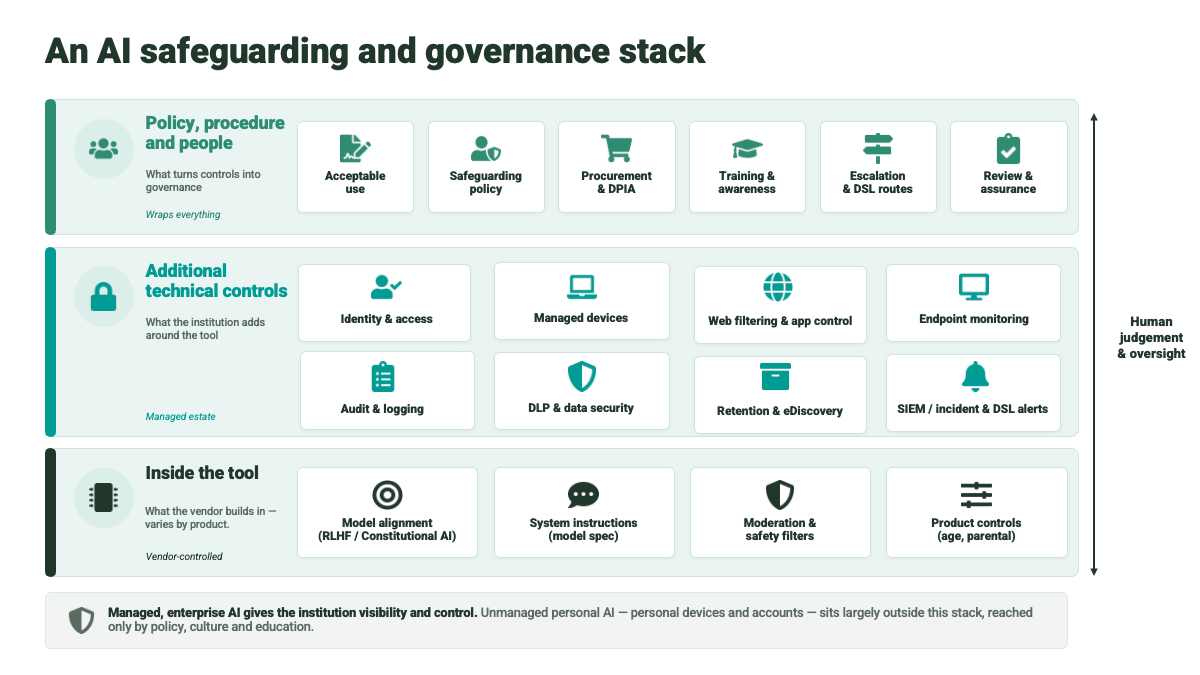
Policy, procedure and people
This is perhaps the most important layer, but I’m not going to focus on it in this post, just because in many ways it’s the most well-understood. I think we broadly understand what we want to achieve, and have policies and guidance in place, so I want to focus on how things play out at a technical level.
Inside the tool
I’m going to start by unpacking an AI-enabled tool in a bit more detail, and look at the role the various components play in safeguarding:
- The underlying model
- System instructions
- Moderation and safety filters
- Product controls
In the case of a pure AI tool like ChatGPT, Claude, or Gemini, each of these layers might be provided by the same developer, but for many education-focused products, the features may well be provided by multiple players. Typically, for example, the core AI model will be provided by one of the big LLM vendors, but the instructions and application-specific features will be provided by the developer of the edtech developer.
The underlying model
Broadly speaking, LLMs are developed in stages. First, a base model is trained on large amounts of data to learn patterns in language and other content. Most users rarely, if ever, interact directly with this raw base model. The base model would represent the best and worst of human output, and would be unsafe to use in education, at least with students under 18.
The model is then adapted through further training and testing to make it suitable for use in a commercial product. That means making it more helpful, easier to interact with, better at following instructions, less likely to produce obviously unacceptable outputs, and more aligned with the provider’s legal, regulatory, reputational and commercial requirements. So safety is part of this as the provider is trying to create a product that users will trust, customers will buy, regulators will tolerate, and the company can defend.
The model itself is the same if it’s used within ChatGPT or embedded within a product. This isn’t necessarily so for the rest of the layers I’m going to describe.
The system instructions
The behaviour of the model is then further defined by what’s known as a system instruction. This is a set of statements or rules, very much like a prompt, which is fed into the model to guide how it responds. These instructions sit largely at the application layer. So ChatGPT will have its own set of instructions, and these will be different from those in products that use the OpenAI API.
The system instructions for the main general-purpose tools are hidden, although they have very occasionally been leaked over the last few years. So we don’t know exactly what they say, but we can reasonably assume that the main AI tool providers, with their large budgets and obvious commercial incentives, have put a lot of effort into them. These system instructions almost certainly give the model further steers on how to behave safely. Hypothetically, for example, a system instruction might say:
“Do not provide instructions, encouragement or detailed methods that could help a user self-harm. If the user appears to be at risk, respond supportively and direct them towards appropriate help.”
So the system instructions are part of the overall layer of defence, and potentially something we might ask vendors about.
Moderation and safety filters
Despite the tuning of the underlying model, and the system instructions, AI tools can and will still produce unsafe or undesirable outputs. So the main LLM providers all have some form of moderation or safety filtering. These are used in their main consumer products, such as ChatGPT and Gemini, and can also be used by developers building products on top of their models.
The details vary by provider. OpenAI, for example, provides a moderation API. Gemini uses configurable safety settings. But the broad idea is similar: the product can check the user’s prompt, the model’s response, or both, to identify content that falls into particular risk categories.
The categories vary, but commonly include things like:
- hate or harassment
- sexual content
- self-harm
- violence or graphic violence
- dangerous or illegal activity
So they align well with some of the concerns we considered at the start of this post.
These filters may work before the model responds, after it has generated a response, or both. This is why, in some tools, you may see a response start to appear and then be replaced by a message saying the tool cannot continue.
You may well have seen these in action – I’ve found them easier to spot in Gemini. For example, I was using Gemini to help me replace a battery in a device, and it would tell me how to do it, and then decide it was dangerous (it was a soldered-in battery), and delete the response.
Again, these filters are not foolproof, but they add another safety layer. When institutions buy education tools built on an LLM API, it is reasonable to ask whether the product makes full use of the moderation and filtering tools provided by the model provider, whether the vendor adds its own filters, and what actually happens when content is flagged.
Product Controls
The final area we’ll look at within the tool is the controls and features added at the product level.
ChatGPT, for example, has parental controls. These allow parents to link to their teenage child’s account, manage some settings, set quiet hours, and receive safety alerts in certain situations. OpenAI has also introduced age prediction, so that if it thinks an account may belong to someone under 18, it can apply additional safeguards. These are intended to reduce exposure to sensitive or harmful content, including areas such as self-harm and other age-inappropriate material.
These are features of the ChatGPT product, not simply features of the underlying model. So they do not automatically follow through to other tools built on the OpenAI API. An education product using the same model may have quite different product controls.
The education version of ChatGPT works differently again. In an education setting, the institution manages the account, and the user’s age or role may already be known. So the product does not need to infer age in the same way, and there is no equivalent of a parent-linked family account. Organisational logging and oversight are separate issues, which we will come on to later.
ChatGPT is not unique here. Other education or workplace AI products have their own product-level controls. Google and Microsoft tools, for example, sit inside managed organisational accounts, where access, age or role, permissions and data settings may be controlled by the institution.
So when you assess an AI tool, you need to look at the product that has actually been built around the model, not just the model provider named in the supplier’s documentation.
Additional technical controls
The tool itself is only part of the picture. There is a wider family of technical controls that form part of the broader governance toolkit.
The challenge for education and safeguarding is that many of these tools were originally created for corporate compliance, security or information governance, rather than safeguarding. The underlying technical challenge is similar: make sure people can access the things they should, stop the wrong content leaving the organisation, and spot behaviour that may need intervention. But the purpose is different. A compliance team may be looking for data loss, fraud or misuse of confidential information. A safeguarding team may be looking for signs that a learner is at risk.
It is still worth running through these controls, because they all play some part.
Identity and access
Our colleges nearly all have well-developed identity management systems. Their core function is to help ensure that you are who you say you are, and that you have access to the systems and data you are entitled to use. From a safeguarding perspective, they can also help establish important context, such as age, role, institution, course or year group. This matters because an AI tool does not need to guess whether someone is under 18 if that information can be provided through a managed institutional account.
Web filtering
In the good old days, by which I mean before generative AI, web filtering was arguably the main way of making sure learners did not access content they should not see online. It worked by blocking access to known unwanted sites, and more advanced systems could also inspect pages and block content on the fly.
Generative AI complicates this. The harmful content may not be sitting on a known website. It may be created dynamically in response to a prompt. That does not make web filtering irrelevant, but it does mean it is no longer enough on its own.
Endpoint monitoring
This is where things get interesting from a safeguarding perspective. Endpoint monitoring tools run on managed devices and can monitor activity directly on the device. Depending on the product, this might include web activity, search terms, typed text, screenshots, documents, chat messages or other signals.
This matters more than it might first sound. Web filtering can see which sites a learner visits, but it can’t see what’s typed into an AI chat, and with generative AI the conversation itself is where the safeguarding signals are. Endpoint monitoring is, in practice, the only layer in this stack that can actually see those conversations.
Some products used in schools and colleges, such as Smoothwall Monitor, are explicitly designed for safeguarding. Smoothwall describes Monitor as a real-time, human-moderated digital monitoring solution that alerts safeguarding teams when students may be vulnerable. Other descriptions of Smoothwall monitoring refer to keystroke and screen-view monitoring, with flagged incidents reviewed and escalated to safeguarding staff. The privacy implications are obvious and significant.
That’s why proportionality matters here, and I don’t believe that monitoring at this depth should be the default position; it needs to be consciously justified, and in practice that means a data protection impact assessment before anything else. What is captured, who reviews it, what triggers escalation, and how long the data is kept all need to be worked through before a tool like this is switched on, not after.
There is also a significant limitation worth mentioning. All of this only works on devices the institution manages. A learner talking to an AI tool on their own phone, over mobile data, is invisible to every layer I’ve described, and no product on the market changes that. Personal devices are the blind spot in this whole architecture, especially when not using the college Wi-Fi.
Logging and compliance systems
In an ideal world, all systems that we wanted to monitor from a safeguarding perspective would send relevant logs to a central location. We would then have one product that could apply rules, generate alerts, support review workflows and keep an audit trail.
The technology for this kind of centralised logging and alerting exists. Microsoft Purview, for example, includes audit, insider risk and compliance tools that can use signals and logs to support investigations, compliance obligations and the management of security or data risks. But the purpose is not the same as safeguarding. These tools are primarily designed for information protection, compliance, security and insider risk, not for managing learner welfare concerns.
Data Loss Prevention
If we broaden safeguarding to also consider protecting safeguarding information about learners, data loss prevention (DLP) tools are an important element. Their job is to stop sensitive information leaving the organisation, for example personal data, financial information, confidential documents or intellectual property.
The safeguarding angle is that some of the most sensitive information in a college is not commercially confidential. It is information about learners. Safeguarding notes, disclosures, behaviour records, SEND information, health information, disciplinary records or details of a learner’s personal circumstances should not be casually pasted into an unapproved tool. Data loss prevention tools can help identify and block some of this activity, particularly where staff or students are uploading documents, copying large amounts of text, or sharing information with external services. But again, the tool is usually designed for compliance rather than safeguarding. It may recognise a National Insurance number more easily than a paragraph describing a learner at risk. So the policy, configuration and review process matter.
That difference between information compliance and safeguarding is important, as although the same technical pattern, collecting signals, applying rules and escalating cases, can be useful for safeguarding, the policies, thresholds, people, language, legal basis, review process and accountability are different.
Additional technical controls – final thoughts
So is that helpful? I’ve run through the range of tools that could play a part in safeguarding, but I’ve not said exactly how they should be used. The reality is the AI technology is running ahead of the compliance technology, and some of this we’ll need to work through collectively.
Wrapping things up
So where is this going? First, I think if we are to really address AI safeguarding, it helps if we all have a basic understanding of the various parts available to us. That’s why I went into detail on the different layers of the tools.
We then, in my view, need to fold safeguarding into broader governance and compliance planning. This perhaps won’t be easy, and I know many colleges are at very early stages in this broad area. Many, for example, won’t yet have data loss prevention approaches in place. But, hopefully, as I’ve argued, this can be seen as part of the jigsaw. So what next?
I think the first step is to map the layers. Which AI tools are learners and staff actually using? Which controls sit inside the tool, which sit in the institution, and which sit with the supplier? What is blocked, what is logged, what is escalated, and who sees it? Colleges do not need to solve all of this at once, but safeguarding, IT, data protection and curriculum teams need to be in the same conversation. AI safeguarding will not be solved by one product or one policy. It will be a governance issue, a technical issue and, still, a people issue.
Find out more by visiting our Artificial Intelligence page to explore publications and resources, learn more about our communities and sign up for our AI Literacy training.
For regular updates from the team sign up to our mailing list.
Get in touch with the team directly at AI@jisc.ac.uk