

This month, we had a busy AI in FE community session with two brilliant presentations. First, we heard from Beth Snowden, EdTech Lead, and Gillian Thom, Higher Education Manager at Craven College, who shared their responsible AI researcher pilot.
We were then joined by Mark Monahan, Vice Principal, Digital and Communications at Brighton Hove & Sussex Sixth Form College (BHASVIC), who took us through their journey developing in-house academic AI agents.
Read on below for a recap of the session and discussions.
You can also view the presentation recordings on our YouTube channel:
- Responsible AI Researcher: Craven College Pilot – Beth Snowden and Gillian Thom
- “Build Your Own Donkey” – Mark Monahan
Building Responsible AI Research Skills at Craven College
Beth and Gillian opened by setting the context at Craven College, a small college based in Skipton with a wide range of provision across FE, HE, apprenticeships, community learning, distance learning and specialist provision.
They explained how the pilot grew out of two related concerns: how AI could support research skills, and how to respond to increasing academic misconduct cases involving misuse of generative tools. They also gave credit to their colleague James Simpkin, who had delivered an earlier workshop to staff on AI for research and delivered the majority of the AI literacy sessions to students.
The result was a three-workshop pilot embedded into their HE study skills programme. With the award of a digital badge for completion, providing recognition to students who committed to the three sessions. They used digital badging platform Navigatr, and you can view the view the Responsible AI Researcher Badge here.
Designing the Workshops
They explained that design of the workshops was underpinned by four key areas:
- Research and exploration
- Collaborative teamwork
- Presenting and communicating
- Giving peer-to-peer feedback
Learners explored what AI is, where they might already be using it, how to prompt effectively, and how AI tools can support research. Tools explored included SciSpace and Research Rabbit, with students gaining hands on experience while considering the effectiveness of the tools critically. They evaluated outputs of the tools as well as considering the wider ethical challenges of AI.
A key part of the pilot was that students worked in groups on their own projects and then presented back to each other. This gave the work a strong peer-learning element, with learners developing not just AI literacy, but also teamwork, collaboration and feedback skills.
Student Perspectives
Beth and Gillian shared that the pilot worked particularly well when the activities were contextualised to the learners’ subject areas. The pilot included students from Conservation, Aviation, and Performing Arts courses with student’s perspectives on AI varying widely. Performing Arts students were strongly interested in the impact of AI on careers and found using the tools to analyse an article on AI’s impact on the creative industry particularly engaging.
The cohort of Conservation students refused to use AI tools themselves and declined to claim the digital badge because of their concerns about the environmental impact of AI. James, who delivered the workshop, had shared that this led to particularly interesting and valuable discussions for the group.
Student’s chosen presentation topics reflected their concerns around AI, and included:
- Social Implications of AI
- Data Privacy and Security
- AI Impact on Performing Arts
- Academic Integrity and AI in Education
Early impacts and next steps
The pilot has had promising early impact with the college seeing a drop in academic misconduct cases related to AI use this year. Beth and Gillian felt students had developed a better understanding overall of how to use AI ethically and effectively. They also highlighted the value of running the sessions early in the year, as the group work helped students build confidence and relationships. Many students were keen to claim their digital badge, and it was felt this added to the sense of achievement for completing the workshops.
Looking ahead, Craven College plans to run the same digital badge again and will look to embed further AI research sessions into level 5 and 6 modules too. They also want to develop a version for FE learners, with a lighter focus on research and activities that can be completed with AI tools accessible to under 18’s.
Discussion highlights
During the Q and A our members were interested in how curriculum leaders were involved in the development of the workshops. Beth noted that in this case the cohorts chosen actually included those which she and James teach already (Aviation and Conservation). With the other cohort she noted that involving staff was very important, and staff were involved before the sessions were delivered which helped to focus the content too. For the next iterations of the workshops she emphasised that they will be continuing to focus on collaborating with teaching staff, and that this also presents opportunities to develop staff knowledge of AI too.
The discussion also touched on assessment and how colleges can provide clearer guidance on acceptable AI use including using assessment scales and frameworks. Gillian explained that these conversations formed part of the pilot’s first workshop, with students exploring where AI might be used appropriately, and noted that these conversations are constantly evolving with the technology. AI and assessment has been a recurring topic in our community sessions, and we will be looking to explore more in next year’s sessions.
Access the presentation recording: Responsible AI Researcher: Craven College Pilot – Beth Snowden and Gillian Thom
Build Your Own Donkey – Developing Academic AI Agents at BHASVIC
We then handed over to Mark Monahan, who shared the journey of developing academic AI agents to support A-Level learners at BHASVIC.
He began by describing an early visit to Barton Peveril College, where they were able to see some of their impressive work with AI. His reflection was that while BHASVIC did not have the budgets or development capacity to replicate exactly what they’d seen, they could focus on building something reliable and sturdy. The decision was made to “build the donkey” rather than chasing the unicorn.
He explained how they explored a range of pre-built AI education tools, generic large language model (LLM) tools, and even building from scratch. Mark covered some of the pros and cons of these options, for example, self-built tools could offer a lot of flexibility but they came with considerable security concerns and were difficult to scale meaningfully. Ultimately, they landed on Microsoft Copilot Studio as the most viable option. Chosen as it allowed the creation of custom AI agents that work from a curated knowledge base within a platform that includes enterprise-level data protection.
Building the agents
Mark explained how the work to build the agents was grounded in a pedagogical approach. The design of the agents was informed by conversations with teaching staff, exploring how an agent built to act like a tutor should behave and respond to students. The aim was not to have agents that gave full answers, but ones which could provide scaffolded support for learners while also stretching and challenging them.
He emphasised that this was no easy task, but there were some significant breakthroughs during the development process that made things possible. The introduction of Copilot Studio’s ‘topics’ feature allowed them to direct the agent’s behaviour in specific situations, making the behaviour of the agent more deterministic. The release of newer LLMs also improved the outputs from agents, making them less robotic in tone than earlier versions. He did note that different model choices do incur different token costs, with the Anthropic models being on the more expensive side, and that they typically find the GPT models suitable for most purposes now.
Agent Design in Practice
Mark gave us a live demonstration of one of the agents, a tutor for A-Level Sociology called Blue. He toured the backend of the agent first, demonstrating how it had been set up with a detailed set of instructions, informed by those conversations with staff specified the subject scope, pedagogical behaviours and style guidance which dictate the agent’s outputs. Including aspects such as specifying the agent does not provide full answers, uses Socratic questioning methods, and guides students to develop their own sociological thinking.
Additionally, instructions included important safeguarding specifications, for example, telling the agent to decline to answer inappropriate requests and to direct students to human support routes where needed.
He then showed the supporting knowledge sources which the agent exclusively works from, including course specifications, glossaries and student packs. Each is uploaded with a description stating to the agent what kind of queries the information should be used for. They also experimented with different file formats for providing the sources and discovered that simple markup files seem to work best, making the information easily readable to the agent.
Mark highlighted the challenges of developing the agents, particularly the Sociology agent, which needed to handle sensitive topics carefully to support a course on crime and deviance. The Copilot Studio topics feature proved especially useful, allowing them to set instructions that are triggered when learners mention specific topics, skills or questions.
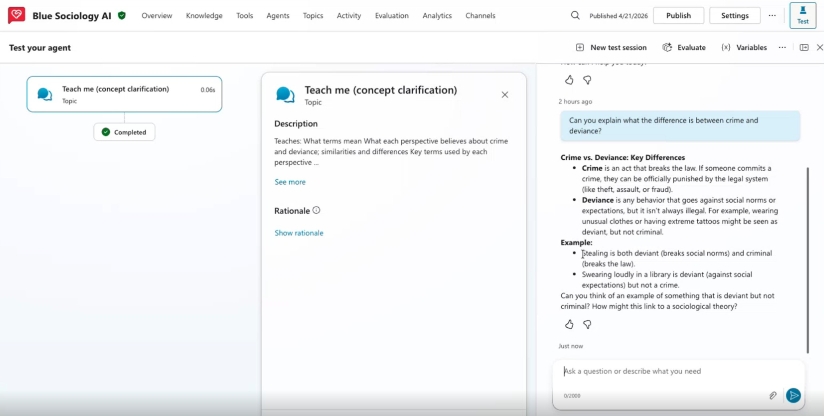
In a live demo Mark showed all of that development work coming together in action. Beginning with a prompt to the agent asking it to explain the difference between crime and deviance. This triggered a topic ‘concept clarification’ which set the agent on to providing a definition, examples and a question to prompt the student to try to come up with an example themselves. The ensuing conversation showed the agent continuing to answer using the knowledge base and prompt the student with questions.
Agents Across Subjects
The college now has agents in development or use across a range of subjects including psychology, English literature, philosophy, business, chemistry, sociology and economics. He did note that STEM subjects can present a particular challenge because large language models are not so reliable with calculations. Mark shared how tools such as code interpreter can help with those more deterministic tasks, such as producing graphs from formulae.
In our Q and A members asked some practical questions around costs and feedback. Mark shared that the team uses prepaid credits for Copilot Studio consumption, which helps to control costs. With several agents now live across different subjects, they are actively gathering feedback directly from users and have received a lot of positive feedback already. Finally, he also recommended the Power Platform in a Day Workshops from Microsoft for those interested in building agents themselves.
Access the presentation recording: “Build Your Own Donkey” – Mark Monahan
Join us in July
Thanks again to Beth, Gillian and Mark for such thoughtful and practical presentations, and to everyone who joined the discussion this month.
Our next AI in FE community session will be on 7 July12.30-1.30. We will be joined by Tom Moule, Senior AI Specialist at Jisc, who will share insights from the Jisc marking and feedback with AI pilot. Considering some of the key questions:
- How can staff and students be engaged where there are anxieties around AI?
- What does it actually mean to keep the human in the loop?
- How can the abstract concept of ethical AI be boiled down to something practical and manageable?
Join our AI in FE Jiscmail list with your institutional email to receive invites.
Find out more by visiting our Artificial Intelligence page to explore publications and resources, learn more about our communities and sign up for our AI Literacy training.
For regular updates from the team sign up to our mailing list.
Get in touch with the team directly at AI@jisc.ac.uk