
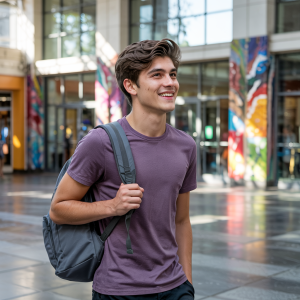
Photorealistic image created by Shaun Daubney, Newbury College, using Ideogram.
Introduction
Jisc’s Artificial Intelligence team runs pilot projects to help the education sector build confidence and capability in using AI. These pilots give participating staff and students direct experience using AI technologies, and the resulting insights are shared across the wider sector.
In autumn 2024, Jisc launched a pilot on AI image generation. The aim was not to evaluate a specific product, but to explore how image generation could be used in educational contexts. In which areas can AI image generation be applied most fruitfully? What knowledge and which skills are needed to use it effectively? And what are its downsides and limitations? You can see some examples of the images created along with the prompts in our gallery at the end of this blog post.
The project was designed to be exploratory and open to all Jisc member institutions, with no caps on participant numbers. Participating institutions were supported through:
- Regular drop-in sessions for discussion and sharing practice
- Written guidance and toolkits, including step-by-step introductions to popular tools like Firefly, ChatGPT and Canva
- A dedicated Jiscmail for participants to discuss use cases, reflect on techniques, and raise concerns
44 institutions signed up to participate in the pilot, with a near-even split between colleges and universities. Participating staff included teachers, librarians, learning technologists, and professional services teams. Students contributed directly through classroom activities and feedback sessions.
This report summarises the key findings from the pilot, highlighting:
- The most effective use cases of AI image generation
- The skills and techniques that led to effective images
- The limitations of AI image generation in educational contexts
- Concerns around AI image generation
Use Cases: Where AI Image Generation Added Value
Participants were encouraged to explore how AI image generation could support or enhance their work. This resulted in a wide range of creative, pedagogical, and professional use cases.
Creative Writing and Character Design. In several colleges, educators (particularly English teachers) used image generation to support descriptive writing. Students were asked to design a character—sometimes based on a book, sometimes newly imagined – and generate an image to match their description.
AI Literacy. Acknowledging the propensity for AI to generate fake or biased content, one participant used image generation tools to develop students’ understanding of these risks and shortcomings. Students were tasked with spotting deepfakes, identifying subtle biases, and developing processes for verifying the validity of content.
Brainstorming and Idea Generation. Many users found image generation most useful during the early stages of a creative task. One graphic designer used it to explore visual possibilities before moving into Adobe Illustrator. Similarly, architecture students used AI to produce exploratory sketches that helped them experiment with layout and concept. A tutor working with illustration students described how students used AI to visualise idioms (“a storm in a teacup”, “walking on eggshells”) and social issues as part of a visual research task. These initial outputs helped learners plan their own compositions.
Staff CPD and Reflective Practice. One university used AI image generation as a novel approach to staff reflection. During a CPD day, participants created an image to represent their experience of the semester. These were then shared in a group discussion. The activity prompted deep reflection and introduced staff to prompt engineering techniques and the limitations of tools.
Library and Learning Resources. Libraries used AI tools to create posters, social media content, and in some cases mocked-up book displays.
Inclusive Practice and ITE. Initial Teacher Education (ITE) tutors used image generation to help trainees critically assess the diversity of their teaching materials. Trainees experimented with prompts such as “female electrician” or “diverse group of students in a science lab”. This not only revealed the biases of the tools but sparked conversations about representation in education.
Assignment Enhancement and Visual Guides One course used image generation to help students create comic-strip style guides showing the steps of a practical task. In another college, students created images to illustrate personal statements or portfolios.
Student Competitions One college ran a competition to design a logo for their campus TV screens (SSTV). Students used tools like Copilot to generate and refine ideas.
Illustration for Abstract Concepts A staff member described how image generation helped them illustrate abstract or intangible concepts, such as “software testing” or “community impact”. These images, while not always precise, offered effective visual cues for presentations and Moodle content.
Skills and Techniques: What Works
Participants discovered that getting good results from AI image generation is not about pressing a button—it’s about knowing how to interact effectively with generative AI platforms. Prompting effectively was hence imperative for creating worthwhile images. During the pilot, two broad strategies emerged.
Prompts as conversations. When using conversational tools (e.g. ChatGPT or Copilot), participants found it useful to not think of a prompt as a single instruction, but rather as a conversation. Have a discussion with the platform about what you want to achieve through the image and work collaboratively to reach your desired outcome.
Suggestions from participants included:
- Creating an initial prompt and asking for feedback
- Giving the AI your overall aim, and asking it to help you break it down into smaller components
- Giving the tool an existing image, and asking for a prompt that would achieve it (thereby helping you to understand how prompts map to images)
- Asking the AI about what visual elements would help you achieve your vision
Visually Rich Prompts. Alongside conversational approaches, participants also highlighted the value of visually rich prompts—that is, prompts that are packed with clear, specific, and often technical visual detail. These kinds of prompts helped to generate more accurate and compelling images, particularly when users already had a strong vision of what they wanted to create.
Visually rich prompts typically included:
- Specific objects and environments – Rather than saying “a classroom,” users might specify “a sunlit science classroom with wooden desks, glass beakers on the shelves, and a whiteboard at the front”
- Technical language – Where appropriate, participants used domain-specific terms (e.g. “a cross-section of a mitochondrion,”), which helped the AI understand the expected structure and form of the image
- Stylistic direction – Descriptors like “in the style of a textbook illustration,” “realistic lighting,” or “isometric layout” helped guide the tone and layout of the image
- Composition details – Some prompts included framing choices, such as “close-up,” “birds-eye view,” or “subject centered with blank space around the edges for annotation”
Comparing Platforms
Different platforms tended to suit different contexts:
- Copilot worked well for short, descriptive prompts—students praised its reliability when designing logos or character visuals
- Adobe Firefly was often used where institutions had existing Adobe licences and when copyright-safe imagery was important; some used its generative fill and vector export features alongside Photoshop and Illustrator
- Canva was a familiar choice in many colleges due to education accounts. It was used for testing ideas, designing posters, and generating images for displays
- Replicate.com and Ideogram were valued when images needed embedded text (e.g., posters, slides, logos); one participant found Ideogram especially effective for clean typography, while Replicate was praised for pricing transparency
- ChatGPT was helpful for those who wanted to clarify and crystallize their ideas as part of an initial discussion, before creating the image as part of an integrated workflow
Limitations and Challenges
Sometimes stock images can be just as good. While AI image generation opened up new creative possibilities, some participants found that existing stock libraries were often preferable. Stock images can be quicker to arrive at, are less likely to contain glitches, and have fewer complications around usage rights.
Lack of Realism. AI-generated images often included inaccurate or inconsistent elements: extra fingers, twisted limbs, impossible shadows. For some educators, this made the outputs unusable in a formal context.
Poor quality content. In addition to the images sometimes having critical flaws, it was also often the case that resultant images were simply not good enough to use for their required purpose. The accuracy of text in images was often cited as a shortcoming of the AI tools.
Tool Bias and Representation Gaps. Across the board, users observed that image generation tools tended to default to Western-centric, stereotypical imagery. Without specific prompting, characters were often white males, for instance.
Access Inequality. Staff and students raised concerns about access:
- Students using older phones or college computers couldn’t always run tools effectively
- Subscription-based tools produced better results, creating a “premium gap” between students with and without access
Guardrails and Censorship. Attempts to generate realistic but sensitive scenes—e.g. arguments on planes for aviation courses—were blocked by AI platform guardrails. While these restrictions are understandable from a safety perspective, they can hinder legitimate educational scenarios.
Job Displacement and Ownership. Students themselves raised concerns about AI displacing creative jobs. Educators often reflected that students wanting to go into the create industries would need to be able to produce work that is better than what AI can produce with minimal input.
Ethical and Environmental Considerations
Environmental impact was one of the most consistent concerns raised. Participants recognised the need to balance the benefits of creating the image with the adverse environmental impacts.
Based on our experiences of the pilot, there are a few ways in which that balance can be achieved. First, before creating an image using generative AI, it’s worth checking whether the image already exists via a search engine. It’s also helpful to identify use cases where image generation adds real value, and remember that not all tasks require a new image.
Similarly, when generating images, a mindful approach can make a difference. This includes thinking through your prompt in advance, or even using a chatbot to refine it, which can reduce the number of iterations. While some amount of trial and error may be needed, and can be valuable for improving your skills, intentional use is important.
Security and Privacy Participants expressed concern about data protection, particularly when uploading personal or student-created images. The release of DeepSeek raised fresh anxieties about data jurisdiction and tool transparency.
Attribution and Transparency There was agreement that AI-generated images should be labelled. Some institutions are exploring the use of watermarks or statements of authorship as part of digital skills teaching.
Usage Rights and Licensing Participants raised questions about whether the images they generated could be used freely, particularly in published materials or external communications. Some platforms, such as Adobe Firefly, offer clear assurances that images generated through their services are commercially safe to use and are subject to well-defined licensing terms. This gave participants confidence when using these images in professional contexts.
However, many other tools do not offer such explicit guarantees. This ambiguity created uncertainty and, in some cases, unease—especially among staff preparing resources for public or professional use. For educational institutions, this highlights the need to check each platform’s terms carefully and consider usage rights as part of their risk management process.
Reflections on the Pilot
Participants reported a notable boost in their confidence using AI image generation tools, with many discovering new, practical ways to integrate them into their teaching or professional practice. The pilot not only deepened their understanding of where and how AI image generation can be effective, but also highlighted its limitations. Overall, most participants found the tools to be useful in some capacity—even if not always essential—and many uncovered applications they hadn’t previously considered.
The collaborative format of the pilot was especially valued for helping participants troubleshoot issues, exchange ideas, and build a supportive learning environment.
Spotlight on GPT-4o: advancements since the pilot
In March (2025), OpenAI released their most advanced image generator to date, now available within GPT-4o. All users have access, though paid subscribers benefit from faster generation speeds and higher usage limits. This update uses an autoregression model rather than a diffusion model and being native to GPT-4o, allows users to refine images through natural conversation. Users can also build on both images and text within the chat context, which ensures consistency across output. Some of the updated features appear to directly address the limitations identified during the pilot.
Photorealism
One of the most noticeable improvements in GPT-4o is the level of photorealism. Facial features, hands, and skin textures are more accurate and refined, which addresses some of the most common limitations seen in earlier models. Poses also appear more natural and the overall image quality, including lighting and shadows, has improved to the point that distinguishing between an AI-generated image and a real photograph is becoming increasingly difficult.
Multiple iterations
This model is much better at contextual understanding, meaning users can now amend certain elements of an image or change setting much easier than before. During the pilot, participants found that the more they iterated an image, the more distorted it became. This no longer appears to be an issue, as the quality now remains consistent across multiple iterations.
Text in images
Text generation within images was a significant concern during the pilot, with most tools struggling to produce accurate results. Ideogram was one of the few exceptions, though it wasn’t accessible to all. With GPT-4o, text generation has improved significantly, and it is now able to produce clear and correct text, making it particularly useful for creating infographics and educational materials. While there are still some limitations, this development is remarkable.
Jisc has shared some findings from testing the new model, which includes some comparisons of images generated during the pilot and those created more recently.
Further Resources
Pilot participants benefited from a resource bank of documents, including how to guides for various platforms. Please feel free to refer to these as part of your implementation journey.
Being mindful of environmental impacts is key to using AI responsibly. Jisc continues to support its members with guidance on this issue.
Conclusion: Putting Insights into Practice
This pilot has shown that AI image generation can be a valuable addition to the educational toolkit—but its effectiveness depends on how it’s used. The tools are not magic buttons; their value comes from thoughtful application, clear purpose, and an awareness of their strengths and limitations.
We encourage institutions and individuals to take insights from this report and explore how image generation might support their own teaching, learning, and professional work.
Here are a few practical suggestions to get started:
- Start with a clear purpose: Think about the problem you’re solving. Are you trying to illustrate an abstract concept, generate ideas, or teach students about digital literacy?
- Experiment with prompts: Try both conversational and visually rich prompting techniques to see what works best for your context.
- Build in reflection: Whether working with staff or students, make time to reflect on the images created—what worked, what didn’t, and what could be done differently next time.
- Prioritise responsible use Choose your use cases thoughtfully, and consider environmental and social factors as part of responsible practice.
Above all, the pilot demonstrated that the best results come from a mindset of exploration and collaboration. We hope this report supports you in continuing your AI journey—and we welcome further reflections, case studies, or examples from your own work as the technology and its applications continue to evolve. If there’s anything you’d like to share, please get in touch with ai@jisc.ac.uk
Image Gallery
Here are a number of examples of the images that were created during the pilot.
South Staffordshire College
One of South Staffordshire College’s aims during the project was to upskill Student Digital Champions (SDCs), enabling them to become proficient in generating images so they could, in turn, support and upskill their peers.
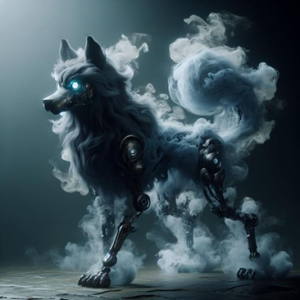
Some of the SDCs began developing their skills through a project in which they created images of mythical creatures.
The image below was created by Vincent (a Student Digital Champion) using Co-Pilot with the following prompt:
“Create me a smoky mythical creature with long legs and robot arms that looks like a dog. Give it a metallic tail. Add some glowing eyes.”
Farnborough College of Technology
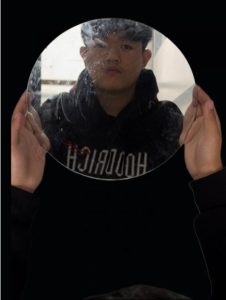
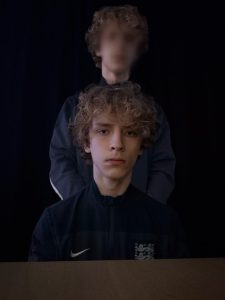
Through the pilot, Farnborough College of Technology introduced AI image generation to an Entry-Level Media group, made up of 16–18-year-olds from the Foundation (SEN) and ESOL departments. AI was used to help them explore creative ideation and visual storytelling in a new way.
Students used Co-Pilot to generate images based on song lyrics, using the IMAGINE prompt technique to shape their results. This approach helped them think more deliberately about how to communicate mood, angle, style, and inspiration.
The IMAGINE structure is as follows:
Idea (main concept)
Mood (e.g. happy, sad, lively)
Angles (e.g. high angle, bird’s-eye view)
Guidelines (specific instructions like “make sure there is…”)
Inspiration (visual reference points, like “like an album cover” or “like Van Gogh’s style”)
Notables (key elements to include)
Effects (e.g. soft light, black and white, pop art)
As well as sparking creativity, the activity led to wider conversations about the ethical use of AI, fake news, and the responsibilities of lawmakers.
Here are some of the results:

University of Liverpool
During the pilot Mareike Wehner, Senior Outputs Development Manager at the University of Liverpool, explored how AI generated images could be used within a guidance document, entitled ‘Navigating Publishing’.
Her approach began with a conversation with Chat GPT. She explained the context of the project, what she ultimately wanted to produce, and her immediate aim – which was to work with Chat GPT to develop a prompt template. She first asked Chat GPT to ask her questions so that it had all the information it needed. And once she had provided her answers, she was given the following prompt template to use:
“Design a square, clean, and minimalist abstract iconographic image reflecting the theme of academic publishing and the idea of ‘navigating.’ Use a color palette that aligns with these hex codes: #00A689, #4A3041, #EF426F, #EA704B, #FFD100, #4BA834, #009CDD, #212B58. The image should be professional and academic, with abstract elements like pathways, maps, or nodes to symbolize navigation and decision-making. Avoid crowded or overly detailed designs. This will accompany the chapter titled ‘[INSERT CHAPTER TITLE, e.g., So you want to publish a monograph]’ with the following description: [INSERT BRIEF DESCRIPTION]. Ensure there is ample negative space so text overlays can be added if needed.”
She input this prompt into multiple image generation tools, with the following results:

(Chat GPT)
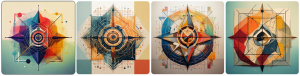
(Firefly)

(Canva Dream Lab)
Images produced through this exercise informed Mareike’s approach, though they have not yet been used directly in publications.
Queens University Belfast
At Queen’s University Belfast (QUB), students on the Master of Architecture (MArch) course used AI image generation in a creative project to design new civic buildings.
One student, Richard Scott, developed a way to “collaborate” with experts by inputting these people’s design ideas and philosophies into the context window.
Using AI tools like ChatGPT and Copilot, he:
- Combined ideas from the different experts to generate synthesised design principles.
- Asked AI to suggest how these combined ideas could shape a civic building in Belfast.
- Generated abstract visual sketches to explore the look and feel of the design.
He used two prompt styles:
- Panoptic prompts – longer prompts bringing together lots of expert ideas at once.
- Condensed prompts – shorter prompts for quicker iterations and refinements.
And here are some of the outputs:
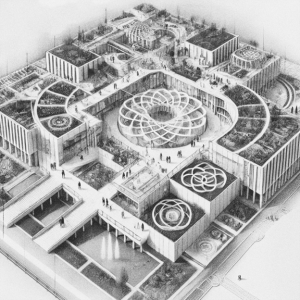
(Image generated via a condensed prompt)
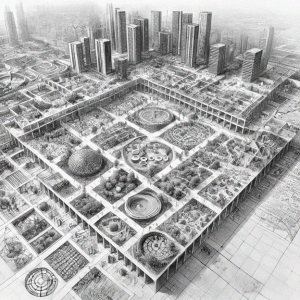
(Image generated via panoptic prompt)
Newbury College
As part of the pilot, Shaun Daubney, Digital Marketing and Communications Lead at Newbury College, explored the use of AI-generated imagery within course guides and across the college website.
His motivation stemmed from two key challenges with using real-life photography:
- Cost and logistics – Traditional professional photoshoots are both expensive and time-consuming.
- Privacy concerns – The college is mindful of students’ digital footprints and aims to avoid placing pressure on learners to appear in marketing materials.
Shaun’s preferred platform for producing photorealistic images was Ideogram, the outputs of which looked genuinely like people, without being too ‘polished’ or ‘perfect’.
A typical workflow with Ideogram included:
- Setting the style to “realistic”, a key feature of the platform.
- Entering a detailed prompt, such as:
“A 16-year-old male with sharp facial features and neatly styled brown hair walks through the atrium of a modern, colourful building. He is wearing a stylish purple t-shirt and has a backpack with school supplies. His expression is happy and confident as he gazes slightly to the side. The background is softly blurred, featuring natural sunlight filtering through large windows, giving a warm and modern fashion aesthetic. The image has a candid but high-quality look with soft shadows and a balanced colour palette.”
- Optionally enabling “Magic Prompt”, a feature that automatically expands prompts for added detail and nuance.
- Uploading reference images to maintain a consistent visual style.
- Refining images using Canvas Mode, which allows further in-app editing.
- Finalising in Photoshop, where images are upscaled and colour corrected for use.

Find out more by visiting our Artificial Intelligence page to view publications and resources, join us for events and discover what AI has to offer through our range of interactive online demos.
Join our AI in Education communities to stay up to date and engage with other members.
Get in touch with the team directly at AI@jisc.ac.uk
