
In our November AI in FE community meetup, we were joined by Alison Fawdrey, English lecturer and digital learning technologist at South Staffordshire College, for a hands-on session. The session explored how generative AI image tools can help facilitate creativity in English classes and support learners with limited confidence or ideas.
Warming up: “Is it real or cake?”
To warm everyone up, Alison shared an activity she often uses with students. She shows them a short “real or cake?” video where everyday objects – a shoe, a plant pot, a bar of soap – might in fact be hyper-realistic cakes. Students have to guess which are real and which are not.
It’s funny and light-hearted, but it sets up a serious point: it is becoming increasingly difficult to distinguish real images from synthetic ones.
Students would then look at side-by-side examples of AI-generated and real photos (for example, frogs with subtly different patterns), building critical visual literacy around what AI “gets wrong” or simplifies.
TwinPics: describing images in just 100 characters
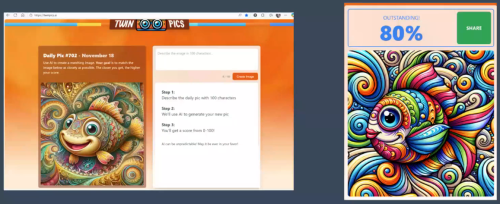
Alison then introduced TwinPics.ai, a simple online game where you are shown an AI generated image and challenged to describe it in just 100 characters. The system then attempts to recreate the image from your description and scores your attempt based on similarity. Because space is so limited, students have to make choices on which details really matter.
Students quickly get competitive about scores and enjoy scrolling through how others attempted the same image.
Creating aliens with Copilot
The main focus of the session was Alison’s long-running “aliens” project. This is an extended piece of work used with both GCSE and Functional Skills English groups, it hinges on the key principle: “We’re using AI to help, not to do”
Students begin in Microsoft Copilot, but they are not allowed to ask it to “write a character description” or “write a story”. Instead, they ask Copilot for brainstorming prompts to help them imagine an alien character. They get suggestions about appearance, abilities, behaviour and habitat, and each learner receives a different mix of possibilities. The class then discusses these ideas and refines them, sketching out the alien in their minds.
Once they have a clear idea, students type a detailed description into Copilot’s image generator to create their alien. The more specific the prompt, the better the image – which reinforces good descriptive writing. Learners then iterate by chatting with Copilot, developing their description and the image in at the same time. Because the college doesn’t have full institutional Copilot licences, there’s a cap on how many images can be generated – Alison found this limit encourages students to think carefully about each prompt before generating.
Once the alien is created, students can then ask Copilot for name suggestions for their alien. They’re not required to use them, but it’s a useful scaffold for those who struggle to invent names.
Alison then brings everything together with a Padlet wall. Each student uploads their alien image alongside their description prompt. Across her groups, learners have created aliens ranging from pink, fluffy beings to unsettling multi-eyed creatures. The Padlet becomes a rich bank of example descriptions.
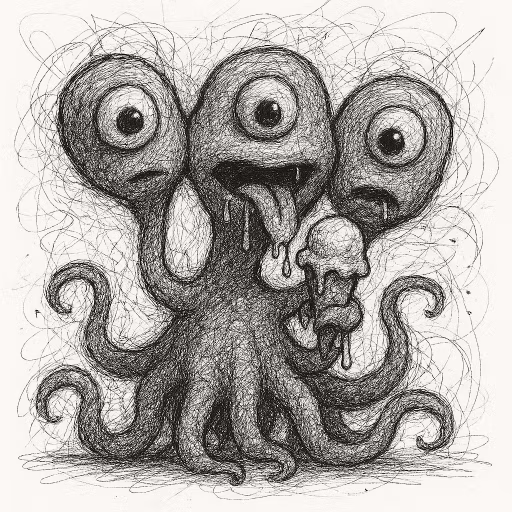
During the meetup, participants were invited to generate their own aliens using Copilot, ChatGPT or other tools and add them to a fresh Padlet – demonstrating how quickly such an activity can be replicated in class.
Using AI for feedback: two strengths and one “even better if”
Alongside creativity, Alison is also exploring how AI can help with feedback and marking. She currently teaches around 120 learners per week, so returning detailed comments on every piece of writing, every time, is simply not realistic.
Her approach is to use AI to provide faster, formative feedback. Students write their creative pieces by hand in their exercise books as usual. They then photograph their work on their phones and upload the images to Copilot or ChatGPT, alongside Alison’s pre-made prompt.
One example prompt positions the tool as an expert Eduqas English GCSE teacher and asks it to give feedback on the creative writing section of a paper in the form of “two strengths and one ‘even better if’”. The AI responds with three clear, targeted comments. Learners copy these into their books in a different coloured pen, so it is obvious what has come from the tool and what was part of their original work.
Alison is very clear that she does not use AI for grading. Instead, she treats AI feedback as an extra layer of support that learners can act on straight away. Interestingly, she has found that AI tools are often quite good at reading messy handwriting from phone photos – sometimes better than a teacher at the end of a long day.
Learners have responded positively. Many are excited to show her the feedback they have received and to talk about what they might change next.
For those interested in exploring this in your own institution, you may wish to join our pilot program on Using general purpose AI tools for Marking and Feedback.
In the Q&A, participants raised a number of important points:
Suitability for lower-level and high needs learners
- Alison confirmed that many of her Functional Skills and skills-for-life learners, including those with high needs, particularly enjoy the alien activities.
- Written outputs vary in length and complexity, but the shared visual starting point helps everyone participate.
Licencing and image limits
- Limited image credits in Copilot can restrict how many iterations a student can generate in one lesson.
- As a result, the college is also exploring Canva for image creation, which currently allows more generations and offers additional design options.
AI slop and sustainability
- Discussion touched on the idea of “AI slop” – generating content just for the sake of it – and the environmental impact of unnecessary image and video generation.
- Activities like Alison’s are deliberately purposeful, tied to specific learning outcomes in language and literacy rather than novelty alone.
The full recording and transcript from Alison’s presentation is available now on our YouTube channel.
December Meetup
Come along to our next community session on the 16th of December where we’ll be joined by Freya Bevan, Digital Learning Coach with AI focus, as she shares where Gloucestershire College is currently in exploring AI as a form of assistive technology to support staff and learners with special educational needs and disabilities (SENDs). This session offers an honest look at our early steps, practical examples, and the opportunities we see for creating more inclusive learning experiences.
Sessions are open to Jisc member institutions. To receive invites just join the AI in FE Jiscmail community. Please be sure to register with your institutional email address.
We have also set the dates for our first two sessions of the new year too, they will take place on:
- January 20th 2026 12.30-1.30
- February 24th 2026 12.30-1.30
Find out more by visiting our Artificial Intelligence page to explore publications and resources, learn more about our communities and sign up for our AI Literacy training.
For regular updates from the team sign up to our mailing list.
Get in touch with the team directly at AI@jisc.ac.uk