

1.Introduction
AI-powered chatbots (also referred to as AI assistants) can serve both students and staff by answering routine questions 24/7, reducing repetitive workloads, and streamlining support processes across an institution. They can be configured to provide information on a wide range of topics, including IT support, admissions queries, course information, library resources, and they can also be used for student support and to help navigate academic resources and learning materials.
In 2024, Jisc conducted a pilot with 12 institutions to assess LearnWise, a chatbot/AI assistant platform that utilises large language models (LLMs). These LLMs are fine-tuned on selected institutional documents and information sources so that the chatbot can give tailored and accurate responses. You can find out more about the technology behind platforms like LearnWise in our blog, Understanding the Evolution of AI Chatbots: A Guide based on learnings from the Jisc LearnWise Pilot.
As part of the pilot, Jisc also worked with LearnWise to develop and launch ExploreAIBot, a chatbot tool that can answer Jisc members’ queries about Jisc’s work on AI, and the advice and support it can provide in this area.
This guide draws upon experiences of the pilot to outline the steps involved in implementing LearnWise, and is intended to support readers to implement educational chatbots and AI assistants more broadly.
Who is this guide for?
- IT managers who want to integrate these tools into existing systems
- Student services teams looking to enhance and streamline support
- Senior leaders or departmental heads assessing the strategic role of AI assistants
2.What is LearnWise?
LearnWise is an AI-driven platform that harnesses large language models (LLMs) to respond to user queries based on the information sources with which it has been provided (i.e. its knowledge base). During the LearnWise pilot, for instance, participants trained their AI assistants using resources including student handbooks, admissions policies, IT support documents, and finance FAQs.
LearnWise was also able to retrieve and integrate information from selected websites into the knowledge base. In developing ExploreAIBot, for instance, LearnWise was given access to the nationalcentreforai.jiscinvolve.org higher level domain, meaning that it could automatically digest information from all of Jisc’s AI blogs.
Supported integrations:
LearnWise can be hosted on or setup to connect with widely used platforms in education, including:
- Virtual Learning Environments (VLEs): Moodle, Canvas, Blackboard
- Learning Management Systems (LMSs): e.g., D2L Brightspace
- SharePoint or staff intranets
- Ticketing systems such as Topdesk or Freshdesk
- Mobile apps or portals like MyDay
The AI assistant can also be hosted on a website, as was the case with ExploreAIBot.

Figure 1 – Image showing that Gloucestershire College placed their AI assistant on the homepage of their publicly accessible website. Prospective students were the target audience.
Further features and benefits
i) Multiple instances
You can create different chatbots/AI assistants for different audiences—e.g., a student-facing assistant on MyDay and a staff-facing assistant on SharePoint—yet manage them all from one dashboard. This means different departments or services can each have a focused, branded assistant without duplicating effort or risking inconsistent information. A further benefit is the consistency of experience for users across the different platforms. This contributes to a sense of shared experience amongst different stakeholders, which contributes the more tailored nature of the individual assistant
ii) Escalation pathways
You define the rules for escalating unresolved queries to human support—this could be in conjunction with an existing ticketing system or to a helpdesk. This means that staff teams receive queries only when the assistants unable to respond, which helps triage workloads.
iii) Analytics
Administrators can review chat transcripts (with user privacy considerations in place), track resolution rates, and see which topics are trending. By spotting patterns, staff can address content gaps and streamline support.
3.Pre-Implementation Planning
Review Existing Systems and Sources of Content
Before choosing where the chatbot will be hosted and what information it will have access to, institutions should take stock of how users currently get their information. Establish where users are going for information or to raise queries and find out which of these platforms are compatible with your chosen chatbot solution.
Meanwhile, review the underlying sources of information, checking in particular for incomplete, inaccurate, out-of-date or missing information. You’ll likely want to also confirm single sign-on (SSO) feasibility if the chatbot is embedded in staff-only areas.
Data Flexibility and Iterative Improvement
Institutions participating in the pilot found that chatbot usage itself helped uncover gaps in their existing data. LearnWise’s dashboard provided insights into trending queries and unresolved topics, enabling teams to iteratively refine their content.
Importantly, LearnWise’s use of large language models (LLMs) means it can handle both structured and unstructured data effectively. This allows institutions to begin implementation without needing to fully clean or restructure their data beforehand. Instead, onboarding can be approached as a continuous improvement process, where the assistant helps surface missing or outdated information over time.
This flexibility reduces barriers to entry and supports a more agile rollout, especially for institutions with complex or fragmented data sources.
Use Data to Decide on Placement
Deciding which platform the chatbot should appear in could involve analysing page-visit statistics, helpdesk logs, or user surveys. High-traffic locations tend to offer greater potential for impact.
During the pilot, participants often learnt this in retrospect. In some cases, low chatbot usage led institutions to reassess where students prefer to access information, ensuring better placement.
Data Readiness and Governance
To ensure accurate and appropriate responses, prepare and review any documents the chatbot will reference.
- Update existing content where necessary – including information on web pages and key documents
- User permissions – the chatbot’s knowledge base should not be set up so that a user can access restricted information. During the pilot, one of the participants wanted to separate chatbots: one for staff, and one for students. They hence worked diligently to ensure that the knowledge base for each bot did not contain restricted information, with respect to that bot’s intended users.
Escalation Pathways
Decide how queries that the chatbot can’t handle should be escalated. Here, you should consider both escalation routes, and the rules to determine which route an escalated query will proceed along. Routes could involve integrations with ticketing systems, such as Topdesk or Freshdesk, so that escalated queries can be addressed via established processes. And rules could include user-led triggers (e.g. a button that routes a user to a person/team), and system-led triggers (such as yielding a null response).
In the case of LearnWise, key metrics on escalation were available via the dashboard. This allowed users to review the effectiveness of their chosen pathways.
4.Setting Up and Testing
Pilot participants generally tested their chatbots before going live with users. A particular benefit of this process was that it often highlighted that certain information was missing from the chatbot’s knowledge base, or that existing sources required correcting/updating.
Institutions tested chatbots with small user groups (sometimes student digital champions), probing its capabilities and limitations. As part of the testing process, one institution discovered that their chatbot was using inconsistent nomenclature when describing institutional policies and practices. Upon investigation, it was found that the chatbot had been given access to documents that used outdated terminology, meaning the chatbot had learned and was conveying information that was no longer appropriate. Due to their diligence during the testing phase, however, the participant was not only able to recalibrate the chatbot, but also to improve a whole set of institutional documents.
In this situation, it was particularly useful that LearnWise cites its source material, which helps users verify responses and builds trust in the assistant’s accuracy.
5.Building Awareness, Trust and Confidence
Anticipating and Addressing Concerns
When holding interviews with participants to evaluate LearnWise, we asked whether they had held any concerns about the product to begin with. Responses highlighted that setting expectations and allaying concerns are key to successful implementation.
Many participants cited skepticism around the efficacy of chatbots. Previous chatbots had often performed poorly – particularly before LLMs had become mainstream – meaning some stakeholders’ perceptions of chatbots were flavoured by negative first impressions. Similarly, other participants worried that AI tools would add to their workloads or undermine the human aspects of education.
Anticipating these misgivings and convincingly demonstrating the net benefits of tools such as chatbots is key to driving sustainable change within an institution.
Top Tip – show don’t tell. During the pilot, many institutions aided successful rollouts by showing colleagues and students example interactions with LearnWise, and allowing them to have a go themselves. This increased confidence in LearnWise’s performance, and nudged people towards more regular usage.
Encouraging Adoption
- Prominent placement: Make the chatbot easy to find— i.e. a persistent button, a banner, or an icon in the VLE. When rolling out Jisc’s ExploreAIBot, we chose to place the chatbot prominently on the site’s main page, rather than just rely on a widget – which we felt some users might find difficult to locate.
- Conversation starters: LearnWise includes a feature whereby the chatbot/AI assistant can suggest initial questions to encourage further conversation. Participants in the pilot found this feature made early-stage users more confident, although these conversation starters are less important for more experienced users.

Figure 2 – image showing how NPTC’s AI Assistant provided conversation starters in both Welsh and English
Handling Sensitive or Escalated Queries
It’s important to have a clear plan for how user queries on sensitive or high-risk matters are escalated. Users may, for instance, confide in the chatbot details relating to mental health or abuse, either affecting themselves or someone they know.
Ideally, chatbots should include functionality to automatically flag high-risk queries to the institution. However, not all chatbots will have such features, and there are likely to be situations where these flags cannot be immediately acted upon: while the chatbot may be available 24/7, institutions will have set business hours.
Key steps, therefore, are to ascertain with the provider what functionality is available for alerting institutions to high-risk queries. And deciding internally what support the relevant users should get if their query is made outside of business hours.
During the LearnWise pilot, for instance, once college ensured that mental health queries received responses that signposted to external sources (such as charity-run helplines and NHS advice pages) as well as guidance on internal mental health support processes.
6.Ongoing Improvement
Monitor Usage Analytics
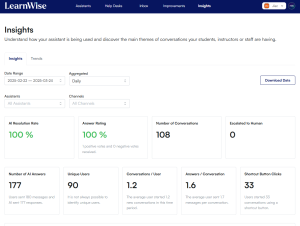
LearnWise includes built-in analytics that track:
- Query volume: the number of conversations per day or per hour
- Response success: how often the bot provides a satisfactory answer vs how often queries are escalated. In particular, institutions can use these insights to identify gaps in the knowledge base and fill these.
- Popular topics: recurring themes, such as timetables or bursary information. For instance, one of the pilot participants used LearnWise on their external website to support prospective students. They found on review that many of the queries were coming from parents of prospective students, and so added information to the knowledge base that was tailored to this stakeholder group.
Update Knowledge Regularly
As policies, deadlines, or course offerings change, so must your chatbot’s content. Out of data information may cause users to lose confidence in the chatbot, and thus disengage.
Gather User Feedback
One effective way of gathering user feedback is to use the chatbot itself. This could be via simple mechanisms, such as a thumbs up or thumbs down after an interaction. Or the chatbot could share a feedback form via a general message to all users.
Institutions may also want to consider periodically bringing groups of staff and students together to discuss the chatbot’s effectiveness and how it could be improved.
7.Implementation Checklist
Use this checklist to ensure a smooth and effective rollout of LearnWise or any educational chatbot within your institution.
Planning and Setup
✅ Assess existing systems and content – Identify where students and staff currently seek information, ensuring key documents (e.g., policies, FAQs, IT guides) are up to date and accurate before training the chatbot.
✅ Choose optimal placement and integrations – Use data (e.g., helpdesk logs, website traffic) to determine where the chatbot will be most effective. Ensure seamless integration with platforms like VLEs, intranets, or ticketing systems.
✅ Define permissions and escalation routes – Restrict access to sensitive information based on user roles. Set clear rules for escalating unresolved or sensitive queries to human support via ticketing systems or designated staff.
Testing and Refinement
✅ Run a structured testing phase – Have staff and students test the chatbot to identify gaps, outdated terminology, or incorrect responses. Use this phase to refine escalation processes and ensure responses are accurate and relevant.
Adoption and User Engagement
✅ Build trust through demonstration – Address any reservations there might be by showing real interactions, running live demos, and allowing staff and students to test the chatbot before full rollout.
✅ Make the chatbot easy to find and use – Position it prominently on high-traffic platforms and enable conversation starters to help new users engage.
Ongoing Monitoring and Improvement
✅ Track analytics and user feedback – Regularly review chatbot interactions to identify common queries, measure resolution rates, and spot knowledge gaps. Gather user feedback through simple rating tools or periodic reviews.
✅ Keep content accurate and relevant – Ensure the chatbot reflects the latest policies, deadlines, and support options. Schedule regular content updates and refine responses based on analytics and user insights. Be particularly mindful of seasonal occurrences – holidays, exams, enrollments etc – and ensure the chatbot has access to up-to-date information to answer these queries accurately.
Find out more by visiting our Artificial Intelligence page to explore publications and resources, learn more about our communities and sign up for our AI Literacy training.
For regular updates from the team sign up to our mailing list.
Get in touch with the team directly at AI@jisc.ac.uk
