
This post is part of a series of blogs looking at different types of AI tools. In this one we are looking at a selection of AI content creation tools that help generate presentations, videos, images, audio, and written materials. These tools are increasingly used across UK higher and further education to support teaching resources, enhance creativity, and make producing engaging content quicker and easier for both staff and students.
We also have a selection of other blogs in this series:
Accessibility | Content Creation | Images | Learning, Skills & Training | Professional Services | Research | Search
Quick jump-to links
Content Creation Tools
Adobe Creative Cloud (Photoshop, Illustrator, Premiere Pro & Express)
Description: Adobe Creative Cloud is a suite of professional applications for design, photography, video, audio and document workflows, including tools such as Photoshop, Illustrator, InDesign, Premiere Pro, After Effects, Lightroom, Acrobat and Adobe Express. Many of these apps now embed generative AI (via Adobe Firefly and other models) for features like generative fill and expand, text-to-image, text-to-vector, AI-powered recolouring, automatic transcription and Enhance Speech. In UK FE/HE it is widely used to support digital storytelling, marketing and communications, portfolio-building, assessment and employability-focused projects, often alongside institutional Adobe Express deployments. (For details on Adobe Firefly as a text-to-image model, see our separate entry in the Images category.)
Getting Started: Access is normally provided through your institution’s Adobe licence (for example, via the Jisc Adobe Enterprise Term Licence Agreement with the Adobe Express option, or through an Adobe Creative Campus deployment). Students and staff typically sign in with their institutional account to use Creative Cloud and Adobe Express on campus devices or personal machines. Where institutional licences are not available, students and educators can buy discounted individual “Creative Cloud Pro / All Apps” plans directly from Adobe’s education pricing pages.
Examples of use:
- University of the West of England (UWE): Staff and students use Adobe Express and its generative AI features to create slides, posters, infographics, leaflets, portfolios, memes/comic strips and short video pitches for teaching, assessment and student projects.
- Kingston University (Adobe Creative Campus): All students and staff have access to Creative Cloud, Adobe Express Premium and generative AI features from Adobe Firefly to create presentations, videos, data visualisations, visually rich documents and podcasts, with an explicit focus on responsible AI use and “Future Skills”.
- Northumbria University (Adobe Creative Campus): Students use Adobe Express Premium and selected Creative Cloud apps to create podcasts, documentaries, presentations and other rich media, building persuasive communication and storytelling skills alongside their subject learning.
- Jisc–Adobe “Transforming together” programme: A cohort of UK universities is working with Jisc and Adobe to embed Adobe Express and Creative Cloud (including Firefly-powered AI) into curriculum design, assessment, digital skills and employability, as part of the Adobe ETLA agreement with the new Adobe Express option.
Key Information:
- Cost: Pricing varies by plan and region. Adobe offers discounted “Creative Cloud Pro / All Apps” plans for students and teachers, with a reduced first-year price and ongoing education pricing thereafter, and separate institutional licensing for schools, colleges and universities. In the UK, many institutions access Creative Cloud, Acrobat and Adobe Express via the Jisc Adobe Enterprise Term Licence Agreement (ETLA), which delivers significant sector-wide savings and campus-wide access. For current costs, see Adobe’s education pricing pages and Jisc’s ETLA information.
- Enterprise version available? Yes — Creative Cloud for Teams and Enterprise, plus sector-negotiated Adobe ETLA licensing in the UK (via Jisc, UCISA and partners).
- Privacy and IPR statement? Yes — see the Adobe Privacy Policy. Adobe states that Firefly generative AI models are trained on content they have permission to use (such as licensed Adobe Stock and public domain material) and not on customers’ private content.
- GDPR statement? Yes — for users outside North America, Adobe Systems Software Ireland Limited is the data controller; GDPR-related rights and data protection details are covered in Adobe’s privacy documentation.
- Accessibility statement or guidance: See the Adobe Accessibility pages for product-level accessibility information and VPATs for key Creative Cloud apps.
- Age Restrictions: Adobe accounts are generally intended for users aged 13+; children under 13 should only use Creative Cloud/Express under appropriate school-managed licences with parental consent (for example, via enterprise or federated IDs, covered by Adobe’s education privacy and COPPA notices).
- Tried by Jisc’s AI Team? Yes — tested and used consistently by several members of the Jisc AI team for creating and editing presentations, images and video assets, and for experimenting with Firefly-powered generative and assistive features in tools like Photoshop, Express and Premiere Pro.
(Entry created 27 November 2025)
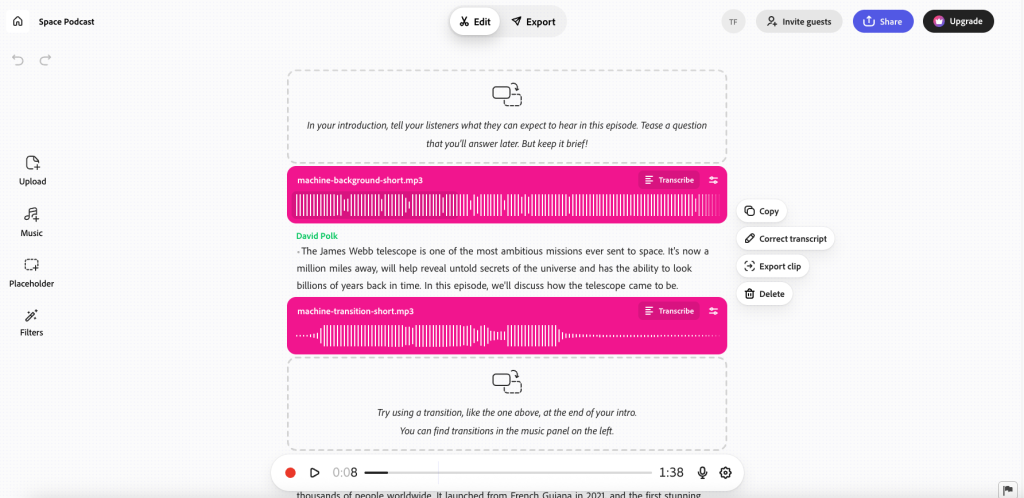
Adobe Podcast
Description: Adobe Podcast is a set of AI-powered audio tools for recording, editing, and cleaning speech. It includes Enhance Speech (removes background noise and room echo), Mic Check (microphone setup guidance), web-based recording and text-based editing, plus automatic transcription for quick edits.
Getting Started: Sign in with an Adobe account at the Adobe Podcast website. Core tools like Enhance Speech and Mic Check are available for free; additional features may require an Adobe Creative Cloud or Express subscription, depending on your plan.
Examples of use:
- None currently – we’d love your submissions of examples
Key Information:
- Cost: Free tools available; advanced/volume features via Adobe Creative Cloud/Express subscriptions (pricing varies by plan).
- Enterprise version available? Yes — available via Adobe Creative Cloud for Teams/Enterprise.
- Privacy and IPR statement? Yes — see the Adobe Privacy Policy.
- GDPR statement? Yes — covered in Adobe’s privacy documentation.
- Accessibility statement or guidance: See Adobe Accessibility.
- Age Restrictions: Typically 13+ with guardian consent where required (varies by country).
- Tried by Jisc’s AI Team? Testing on the free license, a really useful new creative tool
(Entry created 29 October 2025)
Affinity (by Canva)
Description: The Canva Affinity Suite (Designer, Photo, and Publisher) by Canva is a set of
professional-grade creative applications for graphic design, image editing, and layout work. While not built as AI-first
tools, the suite includes emerging AI-powered features for image enhancement, selection, editing, and productivity. It
is commonly used in FE/HE art, media, and digital design courses as a lower-cost alternative to Adobe Creative Cloud.
Getting Started: Download the free app from the Affinity website and sign in with a Canva account to get started
Examples of use:
- None currently – we’d love submissions of FE/HE examples, including student design work and teaching resources.
Key Information:
- Cost: Canva Affinity is free. “You can access all of Affinity’s vector, layout, and pixel tools for free with just a free Canva account. If you’d like to unlock Canva AI tools within Affinity, however, you will need a premium Canva plan.”
- Enterprise version available? Yes – institutional licensing available.
- Privacy and IPR statement? Yes – see the Canva Privacy Policy.
- GDPR statement? Yes – covered within the Canva Privacy Policy.
- Accessibility statement or guidance: No dedicated accessibility statement identified, but likely covered by Canva’s statement on Design Accessibility.
- Age Restrictions: Not clearly stated; likely 13+ based on Canva’s general terms.
- Tried by Jisc’s AI Team? Yes – actively tested by several members of the team and very well received. Strengths include its cost (free), fast performance, strong vector and photo editing tools, and excellent value as a Adobe competitor
(Entry created 25 November 2025)
Bril AI
Description: Bril AI is an AI-powered tutor that creates personalised video courses on different topics using AI. It uses GPT4 to generate these courses and can take prompts based on specific learning goals. It comes
complete with quizzes to test the user’s knowledge.

Getting Started: There is a free plan available with limited usage, just go to Bril AI Signup to get started.
Examples of use:
- None currently – we’d love submissions of examples.
Key Information:
- Cost: Free plan available, the Basic plan is $23.99 per month and the Premium is $39.99 per month.
- Enterprise version available?
- Privacy and IPR: Yes, see the Bril AI Privacy
policy - GDPR statement? Yes, see the Bril AI Privacy
policy - Accessibility statement or guidance: No
- Age Restrictions: 13 years +
- AI Team? Yes, a very useful tool for creating personalised content for specific subjects.
(Entry created 30 October 2024)
Canva
Description: Canva is a free-to-use graphic design platform that provides tools for creating social media graphics, presentations, promotional merchandise and websites.
Getting Started: Go to Canva and create an account to get started.
Examples of use:
- Mentioned here by Jisc AI in this article: Considering
Image Generation and Education Today - An Introduction to using Canva for Image Generation – Jisc
Key Information:
- Cost: Free to get started and also free for Education users.
- Enterprise version available? Yes information on the Enterprise pricing, but also note that Canva for education is
free for students and teachers in eligible schools. more information is available at Canva for Education - Privacy and IPR: Yes, here is Canvas Privacy Policy, also this statement around AI use Canva AI Product Terms
- GDPR statement? Yes, here is Canvas Privacy Policy
- Accessibility statement or guidance: Yes, here is the statement on Design Accessibility
- Age Restrictions: 13 years +
- Tried by Jisc’s AI Team? Yes, used to quickly and easily create a range of presentations for internal use.
(Entry created 28 August 2024)
Elevenlabs
Description: Generative voice AI, including voice cloning and video dubbing.
Getting Started: Free trial for existing voices but requires payment for voice cloning.
Examples of use:
- Voice cloning, AI twins and deepfakes: threat or useful tool? Or both? – Michael Webb (Jisc) March 2024
- Revision Podcasts (Newcastle University)
Key Information:
- Cost: From $5 a month.
- Enterprise version available? Yes – price on application.
- Privacy and IPR: Yes, see ElevenLabs Privacy
Policy - GDPR statement? Yes, see ElevenLabs Privacy
Policy - Accessibility statement or guidance: No statement about ElevenLabs itself, but they do advise on using ElevenLabs to enhance accessibility
- Age Restrictions: Over 18s only
- Tried by Jisc’s AI Team? Yes, extremely effective at voice cloning and dubbing, so great if you want to show an example of this technology.
(Entry created 28 August 2024)
Gamma
Description: Presentation Creation Software
Getting Started: Free trial with a set number of credits.
Examples of use:
- A demo given at Networkshop 24. (Jisc)
Key Information:
- Cost: From $10 a month.
- Enterprise version available? No
- Privacy and IPR statement? Yes, see Gamma’s Privacy
Policy - GDPR statement? Covered in Gamma’s Privacy Policy see ‘Additional information for UK and EEA users’
- Accessibility statement or guidance: No
- Age Restrictions: Over 18s only
- Tried by Jisc’s AI Team Yes, it is an excellent tool, particularly when you provide it with material to base the presentation on.
(Entry created 28 August 2024)
Github Copilot
Description: AI pair programmer, suggesting code completions and using natural language prompts to generate code. It also explains code and is capable of writing documentation.
Getting Started: Create a GitHub account and go to the copilot page to get started on the free tier.
Examples of Use:
- None currently – we’d love submissions of examples.
Key Information:
- Cost: Individual paid accounts are $10 per month. Free subscriptions are available to verified students and Educators. GitHub now has a free tier available to users.
- Enterprise version available? Yes
- Privacy and IPR statement? Yes, see the GitHub’s privacy statement
- GDPR statement? Yes, covered in GitHub’s
privacy statement - Accessibility statement or guidance: Yes, see the GitHub accessibility statement
- Age Restrictions: 13 yrs +, see GitHub terms of
service for more details - Tried by Jisc AI Team? Yes, tested by AI team and licensed by Jisc for use in Jisc’s Developer teams.
(Entry created 28 August 2024, Updated 20 December 2024)
Google Notebook LM
Description: Notebook LM is a personalised research assistant from Google, capable of taking complex topics and converting them into ‘Podcasts’ where the speakers discuss the content in an engaging way.
Getting Started: Go to the Notebook LM website and click the “Try NotebookLM” button for access.
Examples of use:
- None currently – we’d love submissions of examples.
Key Information:
- Cost: Free version and Plus version.
- Enterprise version available? Premium features are available here Notebook LM Plus Pricing, has an Enterprise version and an Education version as well.
- Privacy and IPR: Yes, Notebook LM Privacy
- GDPR statement? Yes, Notebook LM Privacy
- Accessibility statement or guidance: Yes, Google Accessibility
- Age Restrictions: If you’re under the age required to manage your own Google Account, you must have your parent or legal guardian’s permission to use a Google Account. In this case its 13 years+
- Tried by Jisc AI Team? Yes, this is an excellent tool with lots of potential.
(entry created 20 December 2024)
Guidde
Description: AI video documentation – creating standard operating procedures, training, onboarding
docs, and how-to guides with AI.
Getting Started: Visit the Guidde website to get started, or book
a demo with them. To use it you can download their browser extension.
Examples of use: None currently – we’d love submissions of examples.
Key Information:
- Cost: FREE as well as paid options ($16/mo & $35/mo)
- Enterprise version available? Yes, Pricing
- Privacy and IPR: Yes, Privacy Policy
- GDPR statement? Yes, Privacy Policy
- Accessibility statement or guidance: No
- Age Restrictions: 18+ (Privacy Policy)
- AI Team? Yes, works nicely and can create the AI video docs very quickly and easily.
(entry created 27 January 2025)
HeyGen
Description: HeyGen is a Gen AI video platform aimed at video creation with features like customisable AI avatars, text-to-speech capabilities, and multilingual support with real-time lip-syncing. Users can personalise videos by including details like names or company logos and translate content into multiple languages with subtitles.
The platform also allows face-swapping, enabling users to appear as presenters in videos.
Getting Started: Go to HeyGen’s
website and sign up for their free trial to get started.
Examples of use:
- The tool is mentioned in the Jisc AI April
HE Community Session - We’d love submissions of examples.
Key Information:
- Cost: Users can get started with a free tier, and the Creator is $24/m and Team pricing is
$69/m per user. For more info see HeyGens Pricing List - Enterprise version available? Yes, custom pricing available at HeyGen Pricing
- Privacy and IPR: Yes, see the HeyGen Privacy Policy
- GDPR statement? Yes, see the HeyGen Privacy Policy
- Accessibility statement or guidance: No.
- Age Restrictions: 18 Years + Terms of Service
- AI Team? Yes, Tested and found to be a really useful tool, well worth exploring!
(Entry created 26 Nov 2024)
Napkin.ai
Description: Napkin is a very effective AI tool for transforming text inputs into visuals.
Getting Started: Visit the Napkin.ai website to get started for
free.

Examples of use: None currently – we’d love submissions of examples.
Key Information:
- Cost: The starter plan is free, and presently the professional plan is free while the tool is
in beta. Pricing - Enterprise version available? Yes, coming soon Pricing
- Privacy and IPR: Yes, Privacy Policy
- GDPR statement? Yes looks so, Privacy Policy
- Accessibility statement or guidance: No
- Age Restrictions: 13+ (Privacy Policy)
- AI Team? Yes, it’s a great tool, really useful and good at transforming text or concepts into
various charts, especially if the concept is well-structured
(entry created 27 January 2025)
Skybox
360
Description: Skybox AI is a 360° image generator from Blockade Labs.
Getting Started: Get started by going to the Blockade Labs website here there will be a sample prompt that you can generate content from, or you can explore more existing Skyboxes for inspiration.

Examples of use:
Key Information:
- Cost: A free account allows for 15 generations per month, paid accounts provide higher prompt allowances and additional features starting at $12 a month.
- Enterprise version available? Yes, contact Blockade Labs for pricing on application.
- Privacy and IPR statement? Yes, see Blockade Labs Privacy policy
- GDPR statement? Yes, see Blockade Labs Privacy policy
- Accessibility statement or guidance: No
- Age Restrictions: 18+, see Blockade Labs terms of service for more details
- Tried by Jisc’s AI Team? Yes, tested and used by AI team.
(Entry created 28 August 2024)
SlideSpeak
Description: AI tool to create PowerPoint presentations with AI, design presentation slides, or
summarise an entire presentation. Powered by ChatGPT.
Getting Started: Go to the Slidespeak Website and sign up for the
free demo.
Examples of use: None currently – we’d love submissions of examples.
Key Information:
- Cost: There is a basic free plan, and the Premium Plan is currently $24 ($39) a month, with
Premium Plus currently at $29 ($49) a month: Slidespeak pricing. - Enterprise version available? Yes.
- Privacy and IPR: Yes, Slidespeak privacy
- GDPR statement? Yes, Slidespeak privacy
- Accessibility statement or guidance: No.
- Age Restrictions: 13 Years +
- AI Team? Tested by the Jisc AI team.
(entry created 15 October 2024)
SmartyAI
Description: AI-powered Content Generator.
Getting Started: Go to the Smarty ai website and sign up for an
account to get started with the free version.
Examples of use: None currently – we’d love submissions of examples.
Key Information:
- Cost: There is a free version, with a Pro Version at $9.99 pm Smarty ai pricing
- Enterprise version available? Yes, see Smarty ai
pricing - Privacy and IPR: Yes, see Smarty ai privacy
- GDPR statement? Yes, see Smarty ai terms
- Accessibility statement or guidance: None
- Age Restrictions: 13 years +
- Tried by Jisc AI Team? Tested by Jisc AI team.
(Entry created 15 October 2024)
Synthesia
Description: Synthesia is a platform for creating presentation videos delivered by AI avatars.
Getting Started: Users can get started with a free account or by booking a demo with Synthesia
themselves. The free account delivers a single editor and 36 minutes of video per annum.

Examples of use:
- Networkshop demo – an example
showing communications for a new telephony services. (Jisc)
Key Information:
- Cost: £17pm for a starter account, £52pm for a creator account.
- Enterprise version available? Yes
- Privacy and IPR statement? Yes, see Synthesia’s Privacy Policy
- GDPR statement? Yes, covered in Synthesia’s Privacy Policy
- Accessibility statement or guidance: No statement about Synthesia itself but they do provide
guidance on accessible video generation with
Synthesia - Age Restrictions: Services not intended for use by those under 16
- Tried by Jisc’s AI Team? Yes, used by the team with positive results, including translation to
other languages.
(Entry created 28 August 2024)
Veed
Description: Veed.io is an easy-to-use, cloud-based video editing platform ideal for beginners and
casual users, offering features like auto-subtitling, text overlays, and collaboration tools.
Getting Started: Go to the Veed website and signup for a free account, it will then guide you through creating your first video with them.

Examples of use: None currently – we’d love submissions of examples.
Key Information:
- Cost: Get started with a free tier, $9 per user per month, or $19 per user per month – Veed Pricing
- Enterprise version available? Yes, Veed Pricing
- Privacy and IPR: Yes, Veed Privacy Policy
- GDPR statement? Yes, Veed Privacy Policy
- Accessibility statement or guidance:
- Age Restrictions: There is no specified age, but Veed states that it is not to be used by
children. - AI Team? Yes, it is a versatile online video editing platform that’s user-friendly and
feature-rich, catering to a wide audience.
(entry created 27 January 2025)
Vyond
Description: Vyond is an AI-powered video creation platform used for training, learning and development, and internal communications. It offers text-to-video (Vyond Go), AI avatars, instant translation, text-to-image, and a drag-and-drop studio for advanced editing — enabling teams to convert prompts, scripts, documents, or URLs into editable training videos quickly.
Getting Started: Start a free trial on the Vyond website and explore Vyond Go (text/script/URL/doc-to-video). Paid plans unlock higher credit limits, collaboration, stock assets, and enterprise controls.
Examples of use:
- University of Illinois System – accelerated production of training videos (Higher Education, US).
- Case studies include Advocate Health onboarding at scale and Michigan State fundraising guidance (relevant to HE/enterprise training).
Key Information:
- Cost: Starter from US$58/user/month (billed annually); Professional from US$100/user/month (billed annually); Agency from US$137/user/month (billed annually). Enterprise pricing on request. Monthly options available – see plans & pricing.
- Enterprise version available? Yes – SSO, collaboration, higher credits, and admin controls.
- Privacy and IPR statement? Yes – see the Vyond Privacy Policy (last updated January 23, 2025).
- GDPR statement? Yes – privacy policy covers data subject rights and international transfers; opt-out controls at Your Privacy Choices.
- Accessibility statement or guidance: VPAT/ACR available (April 2024) assessing WCAG 2.1 A/AA coverage across key flows (Vyond Studio not covered) – see Accessibility.
- Age Restrictions: 18+ (service not directed to those under 18).
- Tried by Jisc’s AI Team? Not yet.
(Entry created 29 October 2025)
Change Log
-
-
-
- Version 1.1 – Added Eduface, Khanmigo, GeckoEngage, and updated Learnwise
- Version 1.2 – Added Adobe Podcast, Vyond
- Version 1.3 – Added Affinity (by Canva), Adobe Creative Cloud
-
-
Contributors:
Tim Finch, Dan George, Helen Nicholson, Michael Webb, Tom Moule, Manya Sikombe, Sue Attewell
Find out more by visiting our Artificial Intelligence page to view publications and resources, join us for events and discover what AI has to offer through our range of interactive online demos.
For regular updates from the team sign up to our mailing list.
Get in touch with the team directly at AI@jisc.ac.uk