
This post is part of a series of blogs looking at different types of AI tools. In this one, we are looking at a range of learning, skills, and training tools designed to support teaching and study. These tools are already being piloted across UK higher and further education to help educators reduce workload, personalise learning, and increase student engagement. Many can generate lesson plans, quizzes, podcasts, and feedback, while others provide assessment or tutoring features to support learners directly.
This listing includes contributions from across the AI team.
We also have a selection of other blogs in this series:
Accessibility | Content Creation | Images | Learning, Skills & Training | Professional Services | Research | Search
Quick jump-to links
Learning, Skills and Training Tools
aNewSpring
Description: aNewSpring is a learning platform for creating and delivering adaptive, blended and cohort-based training. It combines course authoring, learning journeys, practice & assessment items, and analytics to support skills development for vocational, professional and higher education contexts.
Getting Started: Create an account or request a demo on the aNewSpring website. Educator and organisational plans are available.
Examples of use:
- None currently – we’d love submissions of examples.
Key Information:
- Cost: Pricing varies by plan and organisation size (contact vendor for details).
- Enterprise version available? Yes – team/enterprise deployment options with admin controls and integrations.
- Privacy and IPR statement? Yes – see the aNewSpring privacy information on their website.
- GDPR statement? Yes – aNewSpring indicates EU/UK data protection compliance.
- Accessibility statement or guidance: General accessibility support is described in product materials (formal statement not verified).
- Age Restrictions: Typically for adult users and educators.
Institutional usage applies local policies.
- Tried by Jisc’s AI Team? Not yet, awaiting demo, but looks like a great tool.
(Entry created 29 October 2025)
Anywyse
Description: A Platform that uses generative AI to allow educators to create short podcast-style learning resources.
Getting Started: Start a free trial through the AnyWyse website.
Examples of use:
Key Information:
- Cost: Contact AnyWyse or Jisc Licensing for pricing
- Enterprise version available? Yes
- Privacy and IPR statement?: Yes, see AnyWyse Privacy Policy
- GDPR statement? Yes, included in AnyWyse Privacy Policy
- Accessibility statement or guidance: No statement on AnyWyse itself, some information on using AnyWyse as an accessibility tool is available
- Age Restrictions: None
- Tried by Jisc’s AI Team? Yes piloted successfully.
(Entry created 28 August 2024. updated 30 October 2024)
Bodyswaps
Description: A skills training platform, using VR to create the environments for participants, and with AI-powered analysis to give feedback on a user’s performance.
Getting Started: To get started, you can book a demo with Bodyswaps.

Examples of use:
- Bodyswaps pilot report – Jisc
Key Information:
- Cost: Flexible – varies with use cases. Available through Jisc licensing, see subscriptions manager for details.
- Enterprise version available? Yes
- Privacy and IPR statement? Yes, see Bodyswap’s privacy policy
- GDPR statement? Yes, Bodyswap’s privacy policy
- Accessibility statement or guidance: Yes, see Bodyswap’s accessibility statement
- Age Restrictions: None
- Tried by Jisc’s AI Team? Yes- tested extensively, and successfully taken to pilot.
(Entry created 28 August 2024)
Blackboard – AI Design Assistant
Description: Blackboards AI Design Assistant is a tool aimed at educators to help create learning modules, make rubrics, create question banks, and design assessments for all levels of education. More information on the Design Assistant is available here: Blackboard AI Assistant.
Getting Started: Go to Anthology website and sign up for a 30-day free trial.
Examples of use: Yes, case study here: Case
Study Blackboard
Key Information:
- Cost: Available upon request.
- Enterprise version available? Yes.
- Privacy and IPR: Yes, see the Anthology Data Privacy policy
- GDPR statement? Yes, see the Anthology Data Privacy policy
- Accessibility statement or guidance: Yes, see the Accessibility page
- Age Restrictions: None, more info on data collection and use is available here: Privacy statement
- AI Team? Yes, demo tried and several members of the team have used it previously. Also, a Case study of use from members is available here: Case Study Blackboard
(Entry created 14 October 2024)
Brisk Teaching
Description: Brisk Teaching is an AI assistant for educators that speeds up planning and marking by generating lesson resources, question sets and rubrics, adapting materials to different reading levels, and helping draft feedback directly within common workflows (e.g., Google Docs/Slides via a Chrome extension).
Getting Started: Install the Brisk Teaching extension from their website and sign in with a school or Google account. Free and paid plans are available.
Examples of use:
- None currently – we’d love your submissions.
Key Information:
- Cost: Free tier available; paid subscriptions for individual teachers and institutions – see Brisk plans & pricing.
- Enterprise version available? Yes – organisational plans with admin controls and integrations.
- Privacy and IPR statement? Yes – see the Brisk Privacy Center and the European & UK Privacy Notice.
- GDPR statement? Yes – see the European & UK Privacy Notice.
- Terms of Service: See Brisk Teaching Terms of Use.
- Accessibility statement or guidance: Not specifically published; accessibility depends on materials produced.
- Age Restrictions: Intended for educator use; institutional policies apply.
- Tried by Jisc’s AI Team? Have run through the demo and found it to be a very useful tool for generating learning materials.
(Entry created 29 October 2025)
Century Tech
Description: Century Tech uses AI-driven learning analytics and personalised pathways to support independent study, revision, and skills development. It is used in many UK colleges and universities.
Examples of use:
- Adaptive learning and revision for maths, English, and science; detailed learner analytics for educators.
- AI Case Study: CENTURY – Jisc
Key Information:
- Cost: Institutional subscription
- Privacy/IPR: Yes Privacy Policy
- GDPR statement: Yes – UK/EU compliant, Privacy Policy
- Accessibility guidance: Yes – accessibility statement available
- Age Restrictions: 13+
- Tried by Jisc’s AI Team? Yes, tested by the AI team
(Entry created 21 July 2025)
Claude for Education
Description: Claude for Education is a tailored offering from Anthropic providing educators and students with access to Claude, a conversational AI tool optimised for structured academic use. It is designed to support writing, coding, research guidance, and study support.
Examples of use:
- Students use Claude to explore topics, receive draft feedback, and practice academic writing.
- Educators use it to generate resources, lesson content, and respond to student queries.
Key Information:
- Cost: Free pilot for educators in eligible countries (including the UK)
- Privacy/IPR: Yes, Privacy Policy
- GDPR statement? Yes, Privacy Policy
- Accessibility guidance: Not published
- Age Restrictions: 18+ (HE/FE context)
- Tried by Jisc’s AI Team?Yes, very good
(Entry created 21 July 2025)
Colossyan
Description: AI-based video training tool that converts scripts into narrated avatar-led videos, supporting quizzes and multilingual delivery.
Examples of use:
- Creating accessible training or study videos without filming or editing.
Key Information:
- Cost: Subscription/enterprise pricing
- Privacy/IPR: Yes, Privacy Policy
- GDPR statement? Compliant (with UK/EU presence) Privacy Policy
- Accessibility guidance: Voice-led video supports diverse learners
- Age Restrictions: Adult learners or staff
- Tried by Jisc’s AI Team?Yes light testing
(Entry created 21 July 2025)
Eduface
Description: Eduface is a generative AI platform that provides feedback on students’ work. The workflow begins with educators uploading an assignment brief and an assessment rubric. Students can then view the assignment and submit their work directly on the platform. Educators can generate AI-powered feedback, and review and amend as necessary.
Examples of use:
- Eduface has received funding and support from the University of Leiden, along with other sector partners.
Key Information:
- Cost: Full details of costings can be found on the Chest Agreement page
- Privacy and IPR: Yes, see Privacy Policy
- GDPR statement?
- Yes, see Privacy Policy
- Accessibility statement or guidance: No
- Age Restrictions: 13 plus
- Tried by Jisc’s AI Team? Yes, Jisc has used the demo environment version and has had a full
demonstration of Eduface
(Entry created 2 July 2025)
FeedBack Fruits
Description: An AI platform that aims to improve students’ academic and professional writing styles by automating feedback on structural elements like citation, academic style, grammar, and structure.
Getting Started: Book a demo through the FeedbackFruits website.
Examples of use:
- A complete guide to support students in using AI – FeedBackFruits
Key Information:
- Cost: Full details of costings can be found on the Chest Agreement page
- Enterprise version available? Yes, institutional licenses are offered – pricing available on request.
- Privacy and IPR statement? Yes, see the FeedbackFruits Privacy policy
- GDPR statement? Yes, see the FeedbackFruits Privacy policy
- Accessibility statement or guidance: Yes, see FeedbackFruits Accessibility: WCAG Compliance page
- Age Restrictions: 18+ for US
- Tried by Jisc’s AI Team? Piloted by Jisc AI Team
(Entry created 28 August 2024)
Graide
Description: AI-powered teaching assistant, with an emphasis on reducing workload by utilising AI to assist in essay grading.
Getting Started: Request a demo on the Graide website
Examples of use:
Key Information
- Cost: Full details of costings can be found on the Chest Agreement page
- Enterprise version available? Yes, institutional licenses are offered – pricing available on request.
- Privacy and IPR statement? Yes, see the Graide privacy policy
- GDPR statement? Yes, covered in the Graide privacy policy
- Accessibility statement or guidance: No
- Age Restrictions: No mention on site, but it is aimed at use in universities.
- Tried by Jisc’s AI Team? Yes, successfully piloted
(Entry created 28 August 2024, updated 12 August 2025)
Glean
Description: Glean is a learning platform and note-taking tool powered by AI that helps students capture, organise, and review lecture content. It’s widely used in UK universities for accessibility and independent study support.
Examples of use:
- Students use Glean to record lectures, annotate audio, and automatically generate structured notes for revision.
Key Information:
- Cost: Institutional licensing, individual student subscriptions
- Privacy/IPR: Yes Privacy Policy
- GDPR statement: Yes – UK/EU compliant Privacy Policy
- Accessibility guidance: Yes – designed for disabled students and neurodiverse learners
- Age Restrictions: 16+
- Tried by Jisc’s AI Team? Not yet, but widely adopted in UK HE
Keath AI
Description: Keath.ai is a generative AI platform that provides feedback on students’ essays, reports and dissertations. Educators can train their own version of Keath’s AI model, meaning that the platform is sensitive to specific assessment rubrics and how they are interpreted in practice. The training process requires as few as ten essays to be manually graded against the specified rubric. With Keath.ai, educators are also able to review and amend the platform’s feedback. Keath.ai intends to act as a digital marking assistant – not to replace human markers. This is emphasised by Keath’s human-in-the-loop model, which requires human input to confirm feedback and marks provided by the system.
Getting Started: If you go to the Keath AI Website and click ‘Try Keath’ and you’ll be able to test out Keath using a test file to see how the AI grades and provides feedback on a variety of different assignment types – essays, reports, dissertations and even EPQs.
As you’ll see, feedback is broken down into knowledge, independent study, development of argument, application, and
transferable skills – with each of these sections being marked out of 20. The final score is given out of 100.
Please note that this demo environment uses basic rubrics. The demo does not allow you to customise rubrics, but the full version does have this capability, allowing the upload of mark schemes for additional ease of use.
Examples of use:
- keith.ai is being piloted in over 20 institutions globally, including UK universities.
- Keith.ai is part of the AI in Assessment Pilot – Jisc
Key Information:
- Cost: Costs vary based on the extent of use. Currently, there is a one-time training cost of £300 per module for universities and an annual usage fee of £300 for up to 100 students across 3 assessments within a module. For universities, Keath.ai runs a free trial of up to 10 modules (including training and usage)
and they then offer a paid pilot of up to 50 modules at a 50% discount with unlimited training. - Enterprise version available? See above
- Privacy and IPR: Yes, Keath Privacy Policy here and notes on IPR can be found in their Terms of Service
- GDPR statement? Yes, see Keath Privacy Policy
- Accessibility statement or guidance: Yes, see Keath Accessibility Statement
- Age Restrictions: Intended for use by educators
- AI Team? Yes, Jisc has used the demo environment version and has had a full demonstration of Keath AI, and it is being included in the AI in Assessment Pilot
(Entry created 30 October 2024, Updated 12 August 2025)
LessonUp
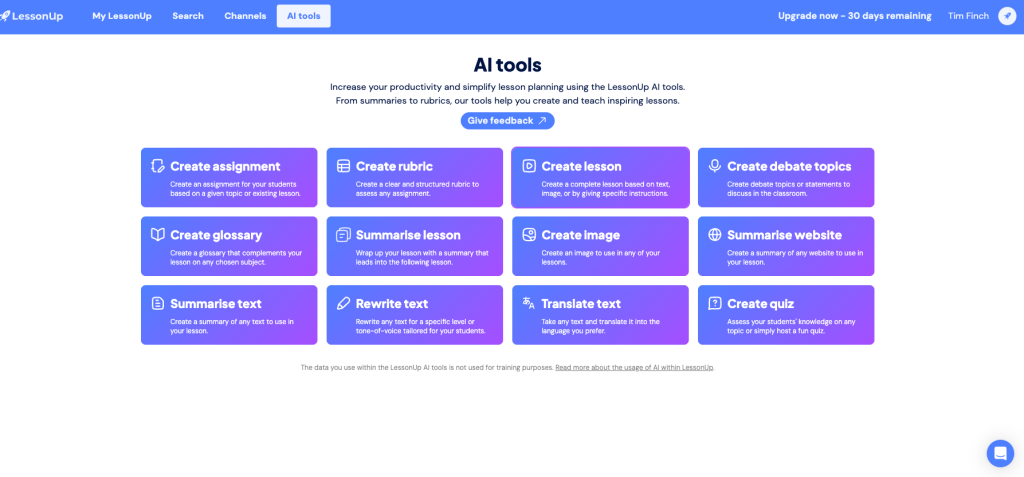
Description: LessonUp is an online teaching platform for creating, teaching and tracking interactive lessons. Educators can build lessons with quizzes, polls, mind maps, drag‑and‑drops, photo questions and interactive video, and use AI tools to generate lesson structures, assignments, images and quizzes. It also supports classes, homework distribution, testing and progress reporting.
Getting Started: Create a free account on the LessonUp website. The Free plan lets you teach up to 10 lessons per month; paid **Start** and **Pro** plans unlock higher limits and more interactive components.
Examples of use:
- None currently – we’d love submissions of examples.
Key Information:
- Cost: Free plan available; **Start** from £7/€7/$7 per month (annual) and **Pro** from £7.49/€7.99/$7.99 per month (annual) for individuals — see pricing. School plans from £6.66/€7.50/$7.50 per teacher per month (annual) — see school pricing.
- Enterprise version available? Yes — School plans with admin environment, licence management, SSO and LMS integrations.
- Privacy and IPR statement? Yes — see the LessonUp Privacy Statement.
- GDPR statement? Yes — covered in the Privacy Statement and Terms.
- Terms of Service: See LessonUp Terms and Conditions.
- Accessibility statement or guidance: Not explicitly published; accessibility depends on activity design and media used.
- Age Restrictions: Not explicitly stated; service intended for use by educators and institutions (see Terms).
- Tried by Jisc’s AI Team? Yes — currently testing and finding it very useful for creating and delivering interactive lessons.
(Entry created 29 October 2025)
Mindsmith
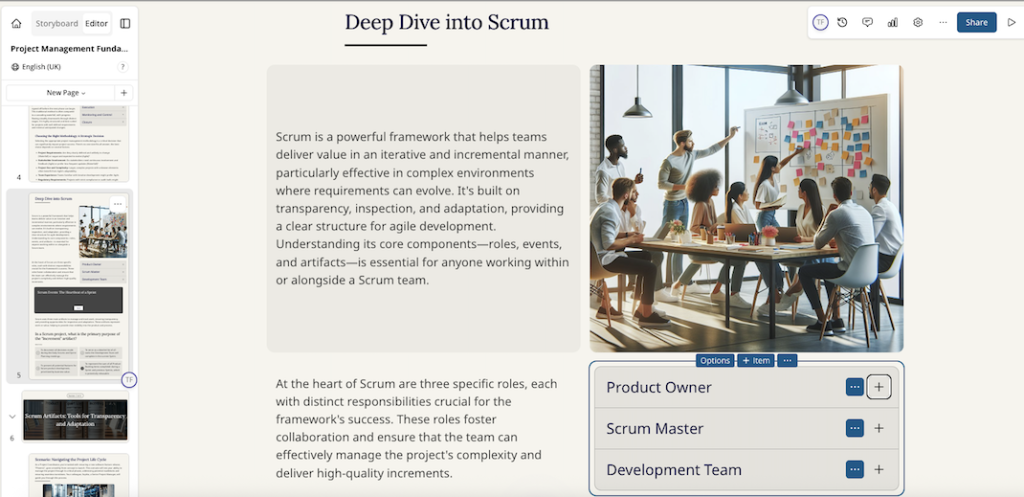
Description: Mindsmith is an AI-native e-learning authoring tool that helps instructional designers and subject matter experts rapidly create interactive modules, quizzes, flashcards, branching scenarios, and multilingual lessons. It supports import of source documents and export to learning standards such as SCORM/xAPI for LMS deployment.
Getting Started: You can sign up for a free plan to explore core authoring features. Paid tiers unlock additional generation credits, collaboration, analytics and enterprise options as well as an education discount.
Examples of use:
- None currently – we’d love your submissions of examples.
Key Information:
- Cost: Free plan available; paid tiers for individuals and teams; enterprise pricing on request – see pricing.
- Enterprise version available? Yes.
- Privacy and IPR statement? Yes, see the Mindsmith Privacy Policy.
- GDPR statement? Yes – covered in the Privacy Policy.
- Accessibility statement or guidance: Accessibility is referenced in product materials; no dedicated statement page identified.
- Age Restrictions: 18+
- Tried by Jisc’s AI Team? Testing on the free plan, a very useful content creation platform
(Entry created 29 October 2025)
Plato
Description: Plato is an AI-enabled academic support platform designed for higher education. It integrates with an institution’s VLE (e.g. Canvas, Blackboard, Moodle) to provide always-available, course-aligned support to students, including personalised Q&A grounded in approved module materials, revision support (such as flashcards and practice questions), and staff-facing analytics to identify common learning gaps and areas of confusion. Plato emphasises curriculum-aware responses, transparency (including surfacing sources), and institutional controls to support academic integrity and responsible use of AI.
Getting Started: Plato is aimed at institutions rather than individual sign-ups. To get started, contact Plato to book a demonstration and discuss a pilot. Deployment typically involves integrating Plato into the VLE via LTI 1.3 and relevant APIs, enabling access without new student logins and with configuration options to restrict outputs to approved course content.
Examples of use:
- University of Sussex (UK): Sussex embedded Plato into its Canvas VLE to provide course-specific AI support aligned to institutional AI principles. The Sussex case study describes restricted outputs to approved academic content, course-aligned Q&A, revision resources, and engagement insights during assessment periods.
Key Information:
- Cost: Pricing is not published on the Plato website; institutions should request pricing via demo/contract discussions.
- Enterprise version available? Yes — Plato is designed for institutional deployment with integrations, administration controls and analytics.
- Privacy and IPR statement? Yes — see the Plato website for Privacy Statement
- GDPR statement? Yes, GDPR compliant – see Privacy
Statement - Accessibility statement or guidance: No dedicated accessibility statement page on Plato’s site.
- Age Restrictions: None specified, though mentions students as the target audience
- Tried by Jisc’s AI Team? Not yet.
(Entry created 14 January 2026)
Readwise
Description: Readwise is an application that allows users
to revisit and learn from their highlighted articles and ebooks using a process called ‘Spaced Repetition’ to encourage memorisation.
Getting Started: To get started, go to readwise.io and click get
started to join their free trial for 30 days.
Examples of use: None currently – we’d love submissions of
examples.
Key Information:
- Cost: Billed as $12.99 pm and there is a 50% academic
discount. This is $9.99 pm if paid annually. - Enterprise version available? No, but discounts for members of Non-profits and Academic Institutions.
- Privacy and IPR: Yes, Readwise privacy policy.
- GDPR statement? Yes, Readwise privacy policy.
- Accessibility statement or guidance: No.
- Age Restrictions: 16+
- AI Team? Tried as a demo, this works well as a tool
(entry created 20 January 2025)
Speedwell eSystem
Description: Speedwell eSystem is a professional-grade assessment and feedback platform used widely in
higher and further education, particularly in medical and health training. It supports the entire exam lifecycle — from
authoring and moderation to delivery, marking, feedback, and post-assessment analytics. Institutions use it to run
high-stakes written exams, OSCEs, and MMIs with integrated data security and reporting tools.
Getting Started: Book a demo or request information via the Speedwell contact page. The platform is designed for
institutional deployment, with cloud-based and on-premise options.
Examples of use:
- According to Speedwell, the eSystem is used by over 80% of UK Russell Group universities and professional
training providers for high-stakes and formative assessments (Speedwell website). - Common applications include medical OSCEs, nursing examinations, and professional competency testing with
automated performance analytics (Speedwell eSystem
overview). - None from members – we’d love your submissions of examples.
Key Information:
- Cost: Pricing varies by institutional scale and deployment model – contact vendor for details.
- Enterprise version available? Yes – institutional and multi-campus implementations supported.
- Privacy and IPR statement? Yes – see the Speedwell Privacy Policy.
- GDPR statement? Yes – covered within the Privacy Policy; compliant with UK data protection law.
- Terms of Service: See Speedwell Terms and Conditions.
- Accessibility statement or guidance: No formal accessibility statement published, though the platform includes configurable accessibility and invigilation options.
- Age Restrictions: Intended for use by educators, administrators, and adult learners in FE/HE and professional settings.
- Tried by Jisc’s AI Team? Not yet tested, but used extensively across HE for assessment and feedback management – a robust institutional platform worth exploring.
(Entry created 5 November 2025)
StudyStash
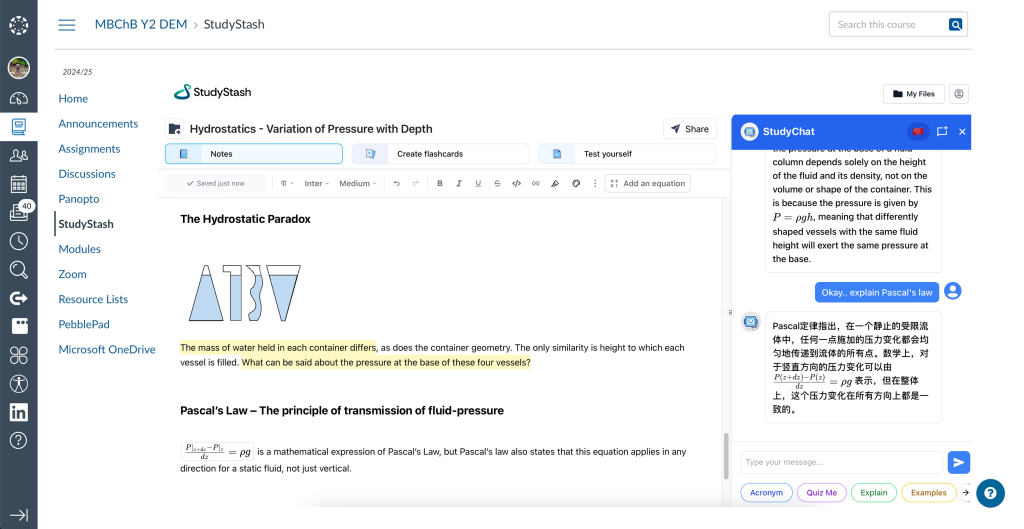
Description: StudyStash is an AI-powered revision and study support platform designed to help improve student engagement with Neuroscience and AI. It integrates with Canvas, Blackboard, Moodle and D2L Brightspace, enabling learners to scaffold their learning by uploading course materials to generate podcasts, practice questions, flashcards and interactive study aids aligned to their content, supporting independent study and exam preparation.
Getting Started: Register for the StudyStash pilot programme via the website.
Examples of use:
- Originated from the University of Birmingham’s student incubator, the Elevate program, with a University-wide education enhancement project.
- Integrated within Canvas at St Mary’s University, across all online courses.
- Being used at the University of Loughborough in the Schools of Architecture and Social Sciences.
- More widely used in Europe at the University of Oulu (Finland), and currently being piloted with all undergraduate students at the University of Latvia, as well as in the US across Ohio, California, and Louisiana.
Key Information:
- Cost: Institutional license
- Enterprise version available? Yes, institutional licenses are offered; pricing is available on request.
- Privacy and IPR statement? Yes – see the StudyStash Privacy Policy: https://studystash.com/privacy-policy. More details can be found on our Trust Center: https://trust.studystash.com. We are ISO 27001 certified, conduct regular independent penetration testing, and are fully GDPR compliant.
- GDPR statement? Yes – included within the Privacy Policy.
- Terms of Service: See StudyStash’s Terms of Use: https://studystash.com/terms-of-use
- Accessibility statement or guidance: StudyStash is fully compliant with the WCAG 2.2 AA standard. Accessibility Statement: https://studystash.com/accessibility-statement.
- Age Restrictions: Not explicitly stated; intended for student use.
- Tried by Jisc’s AI Team? Thoroughly tested by the JISC AI team, a really great product, further testing of new features to take place.
(Entry created 20 February 2026)
Synap
Description: An intelligent revision platform using spaced
repetition and crowdsourced quizzes to help learners retain knowledge more effectively.
Examples of use:
- Daily revision quizzes and memory recall exercises across subjects, especially popular in UK HE.
Key Information:
- Cost: Free basic account; paid plans unlock institutional features
- Privacy/IPR: Yes, Privacy Policy
- GDPR statement? Yes, UK-based – Privacy Policy
- Accessibility guidance: Not explicitly stated
- Age Restrictions: 13+
- Tried by Jisc’s AI Team? Yes
(Entry created 21 July 2025)
IBM SkillsBuild
Description: Free online learning platform with 1,000+ courses in areas like AI, data skills, digital workplace readiness, and employability — includes industry-recognised
credentials.
Examples of use:
- Upskilling students or staff in foundational digital and AI-related skills.
Key Information:
- Cost: Free for open users; partner versions offer enhanced support
- Privacy/IPR: Yes, Privacy Policy
- GDPR statement? UK / EU compliant Privacy Policy
- Accessibility guidance: Standard IBM accessibility framework
- Age Restrictions: Adult learners
- Tried by Jisc’s AI Team? Yes
(Entry created 21 July 2025)
Taskbase
Description: Taskbase is an assessment tool that uses AI to automate aspects of grading and feedback. Utilising AI, the platform evaluates students’ work with respect to pre-defined criteria set by the teacher. It then provides students with personalised feedback, supporting students to improve and grow. The platform is also able to generate exercises for students, based on their needs. It can be integrated with Learning Management Systems, such as Moodle and Canvas.
Getting Started: You can request a demo via their website
Examples of use: Jisc has spoken to colleagues in the further education sector who have trialled
Taskbase on a limited basis, for giving feedback on student essays. The initial outcomes were positive.
Key Information
- Cost: Taskbase offers 3 tiers of usage: Small, Medium, and Enterprise. Please inquire for more details on pricing
- Privacy Policy and IPR statement? Yes, see their Privacy policy
- GDPR statement? Yes, see the Privacy policy
- Accessibility statement or guidance: No
- Age Restrictions: No age limits are imposed by Taskbase, however, they suggest that the tool is more suitable for use by learners above the age of 10
- Tried by Jisc’s AI Team? Jisc has received a demo of the platform, and has plans to explore the platform in more depth (we’ll update this page when we have further insights). We were impressed by the personalied feedback on assessments and look forward to conducting further investigations.
(Entry created 18 November 2024)
TeacherMatic
Description: AI platform for teachers, uses content generation tools to create lesson plans, rubrics, schemes of work and more to save educators’ time.
Getting Started: Register for a free demo at their website.

Examples of use:
- Teachermatic FE Pilot Report – Jisc
- Teachermatic HE Pilot Report – Jisc
- Teachermatic FE Pilot – An Overview of Generating Resources Using Generative AI in Further Education – Jisc
- Teachermatic HE Pilot – Using Teachermatic in the Higher Education Space – Jisc
Key Information
- Cost: Full details of costings can be found on the Chest Agreement page
- Enterprise version available? Yes, organisational licenses are available.
- Privacy and IPR statement? Yes, see TeacherMatic Privacy Policy
- GDPR statement? Yes, included in the TeacherMatic Privacy Policy
- Accessibility statement or guidance: No statement, but tools include accessibility features such as ‘Learning Needs’ specifier to their lesson plan generator.
- Age Restrictions: None
- Tried by Jisc’s AI Team? Yes- tested extensively and taken to pilot.
(Entry created 28 August 2024, updated 12 August 2025)
Tutello
Description: Tutello combines human and AI support for tutoring by using an educator-curated knowledge base to answer student questions, directing them to tutors when needed. It offers analytics to track learning progress and integrates with multiple learning systems while ensuring data privacy and reducing AI errors.
Getting Started: You can request a demo on the Tutello website.
Examples of use:
- Tutello Product Notes – Jisc
Key Information
- Cost: Varies based on usage requirements but more information is available upon request from Tutello
- Enterprise version available? Yes, the team at Tutello are open to discussing how they can meet your usage requirements
- Privacy and IPR statement? Yes, see Tutello Privacy Policy
- GDPR statement? Yes, included in the Tutello Privacy Policy
- Accessibility statement or guidance: This is in the process of being produced (we’ll provide a link here when it has been completed)
- Age Restrictions: Tutello doesn’t currently have predefined age restrictions. Instead, they work with each institution to identify the student audience and implement appropriate safeguards or features based on their specific needs.
- Tried by Jisc’s AI Team? Yes. Jisc AI has explored using the platform from the perspective of bboth students and educators. Our explorations focused on content related to AI and education technology, and calculus. You can find out more about this in our Product Note
(Entry created 10 September 2024)
Wordwall
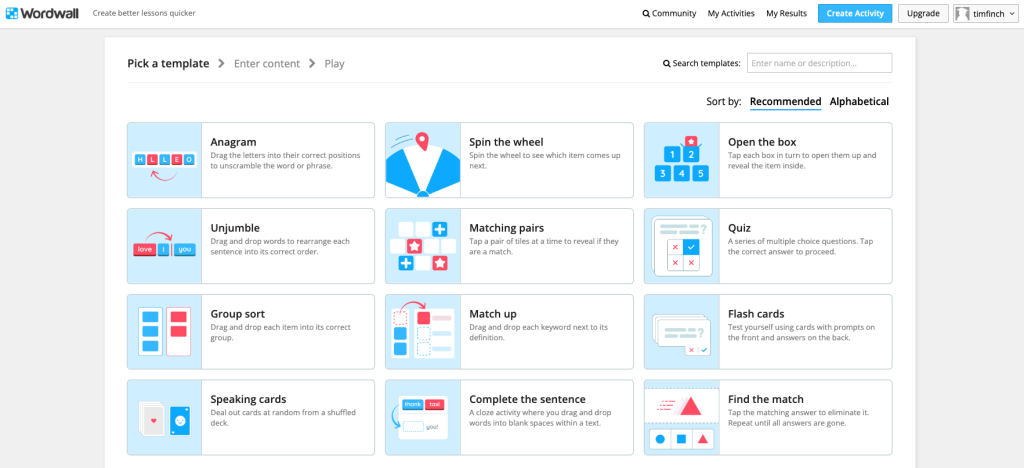
Description: Wordwall lets educators build quick, interactive learning activities – such as quizzes, matching, labelling, anagrams, sorting and game-show style exercises – and also generate printable worksheets from the same templates. Activities can be shared via link or run live in class for formative assessment.
Getting Started: Create a free account on the Wordwall website and choose a template to begin. The free plan allows a limited number of activities; paid plans unlock additional templates, exports and sharing options.
Examples of use:
- None currently – we’d love submissions of examples.
Key Information:
- Cost: Free plan available; paid subscriptions for individual teachers and departments – see the
Wordwall pricing page. - Enterprise version available? Not specified.
- Privacy and IPR statement? Yes – see the Wordwall Privacy Policy.
- GDPR statement? Yes – UK/EU data protection covered in the Privacy Policy.
- Accessibility statement or guidance: No dedicated statement identified; accessibility will vary by template and activity design.
- Age Restrictions: Not explicitly stated; designed for teacher-directed use in education settings. Terms of Service indicate that users must be of legal age to form a binding contract with Wordwall. See Terms of Service.
- Tried by Jisc’s AI Team? Yes, we have explored using Wordwall for creating interactive learning activities and assessments and found it to be a super useful tool.
(Entry created 29 October 2025)
Change Log
-
- Version 1.1 – Added Colossyan, Synap, IBM SkillsBuild, Eduface, KeithAI. Updated Graide, Teachermatic
- Version 1.2 – Added aNewSpring, Brisk Teaching, LessonUp, Mindsmith, Speedwell, Wordwall.
- Version 1.3 – Added Plato.
Contributors:
Tim Finch, Dan George, Helen Nicholson-Benn, Michael Webb, Tom Moule, Manya Sikombe, Sue Attewell
Find out more by visiting our Artificial Intelligence page to view publications and resources, join us for events and discover what AI has to offer through our range of interactive online demos.
For regular updates from the team sign up to our mailing list.
Get in touch with the team directly at AI@jisc.ac.uk