
This post is part of a series of blogs looking at different types of AI tools. In this one we are looking at AI image tools that can generate visuals from text prompts or enhance existing content. These tools are increasingly being used across UK higher and further education to support creative projects, communications, marketing, and learning materials. From presentations and course content to experimenting with generative design, they provide a starting point for exploration and impact.
This listing includes contributions from across the AI team.
We also have a selection of other blogs in this series:
Accessibility | Content Creation | Images | Learning, Skills & Training | Professional Services | Research | Search
Image Creation
Adobe Firefly
Description: Adobes text to image generation tool, built on their proprietary AI model.
Getting Started: Easy to start, just create an Adobe account and access the free plan.
Examples of Use:
Key Information:
- Cost: 25 Free credits per month, Firefly Premium Plan is £4.49pm the Adobe Express plan starts at £9.98/mo incl. VAT
- Enterprise version available? Yes
- Privacy and IPR statement? Yes, see Adobe’s privacy policy and a recent clarification
- GDPR statement? Yes, see Adobe’s extensive GDPR
information - Accessibility statement or guidance: Yes, see Adobe’s Accessibility pages
- Age Restrictions: 5 years + Adobe Firefly K-12
- Tried by Jisc’s AI Team? Yes, tested extensively and used by the team for some content generation and in the Image Generation Pilot.
(Entry created 28 August 2024. updated 12 August 2025)
Artbreeder
Description: Artbreeder lets users generate and remix portraits, landscapes, and abstract visuals by blending and evolving images using AI. Useful for exploring visual style, character design, or mood boards.
Examples of use:
- Creative writing classes, design, or digital storytelling exercises
Key Information:
- Cost: Free basic account; paid plans unlock higher-res images
- Privacy/IPR: Yes – image ownership model explained in terms
- GDPR statement? Not confirmed
- Accessibility statement: No
- Age Restrictions: 13+
- Tried by Jisc’s AI Team? Yes – worth checking out for visual remixing
(Entry created 24 July 2025)
Craiyon
Description: Craiyon is a free, easy-to-use image generator based on an open-source version of DALL·E. It allows users to generate cartoon-style or realistic images from a simple text prompt.
Examples of use:
- Quick visuals for presentations, exercises, or creative classroom content – craiyon.com
Key Information:
- Cost: Free to use with optional paid plans for faster generation
- Privacy/IPR: Yes Privacy Policy
- GDPR statement? None visible
- Accessibility statement: No
- Age Restrictions: 13+
- Tried by Jisc’s AI Team? Yes
(Entry created 24 July 2025)
Canva AI Image Generator
Description: Canva’s integrated AI image generator allows users to create images directly inside the Canva editor, helping to streamline the design process for learning materials, presentations, or marketing assets.
Examples of use:
- Visual aids in slides, posters, or handouts – Canva AI
Key Information:
- Cost: Free plan with basic features; full access in Canva Pro
- Privacy/IPR: Yes Privacy Policy
- GDPR statement: Yes Privacy Policy
- Accessibility statement: Canva Accessibility
- Age Restrictions: 13+
- Tried by Jisc’s AI Team? Yes extensively, and included in the Jisc AI Image Pilot. Commonly used in education
(Entry created 24 July 2025)
Lexica AI
Description: Lexica AI is used for AI-driven image generation based on text prompts. It is primarily aimed at graphic designers, content creators, marketers, and educators. It works on a Stable Diffusion model.
Getting Started: go to Lexica AI and login, there is a limited
free tier which users can use to explore the platform.

Examples of use: None currently – we’d love submissions of examples.
Key Information:
- Cost: Starter ($10/month), Pro ($30/month), and Max ($60/month)
- Enterprise version available? No.
- Privacy and IPR: Yes, Privacy Policy.
- GDPR statement? Yes, Privacy Policy.
- Accessibility statement or guidance: No.
- Age Restrictions: None found.
- AI Team? Yes, and was found to be an effective image-generation platform.
(entry created 20 January 2025)
Midjourney
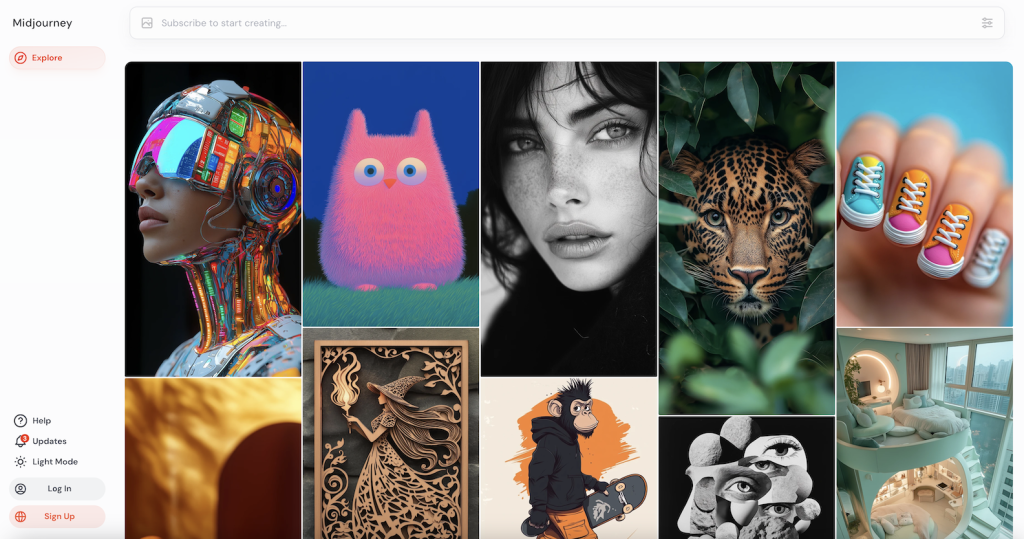
Description: Image generation platform using a custom model, text-to-image only.
Getting Started: Image generation platform using a custom model, text to image. Midjourney includes an image editor that lets you revise prompts, modify specific areas of an image, edit, and add new elements.
Examples of Use:
- None currently – we’d love submissions of examples.
Key Information:
- Cost: $10 pm basic plan, $30 pm for a standard plan
- Enterprise version available? No
- Privacy and IPR statement? Yes, see Midjourney’s privacy policy
- GDPR statement? Yes, see clause 6 of Midjourney’s privacy policy
- Accessibility statement or guidance: No
- Age Restrictions: 13+ and meet the age of digital consent in the country of usage, see clause 3 of Midjourney’s privacy policy for details
- Tried by Jisc’s AI Team? Yes, tested out on Discord by the team
(Entry created 28 August 2024)
Microsoft Designer
Description: Microsoft Designer is a browser-based design platform similar to Canva, with integrated DALL·E image generation for creating graphics, posters, slides, and social media visuals.
Examples of use:
- Creating custom graphics and AI-generated images for presentations or learning materials
Key Information:
- Cost: Free version available with Microsoft account; Pro version with Microsoft 365
- Privacy/IPR: Yes – covered under Microsoft Privacy Statement
- GDPR statement?
- Yes – covered under Microsoft Privacy Statement
- Accessibility statement: Microsoft Accessibility
- Age Restrictions: 13+ with account
- Tried by Jisc’s AI Team? Yes, lots of testing of this tool.
(Entry created 24 July 2025)
NightCafe Studio
Description: NightCafe is an AI art generator that supports multiple models including DALL·E 2, Stable Diffusion, and CLIP. It offers a community-driven platform for creative exploration and classroom visualisation.
Examples of use:
- Visual storytelling projects or concept art creation
- None currently – we’d love submissions of examples.
Key Information:
- Cost: Free with limited credits; subscription plans available
- Privacy/IPR: Yes, Privacy Policy
- GDPR statement? Yes, Privacy Policy
- Accessibility statement: Not listed
- Age Restrictions: 13+
- Tried by Jisc’s AI Team? Yes – community feedback welcome
(Entry created 24 July 2025)
Change Log
-
-
- Version 1.1 – Added Eduface, Artbreeder, CanvaAI, Craiyon, MSDesigner, Nightcafe
-
Contributors:
Tim Finch, Dan George, Helen Nicholson-Benn, Michael Webb, Tom Moule, Manya Sikombe, Sue Attewell
Find out more by visiting our Artificial Intelligence page to view publications and resources, join us for events and discover what AI has to offer through our range of interactive online demos.
For regular updates from the team sign up to our mailing list.
Get in touch with the team directly at AI@jisc.ac.uk