
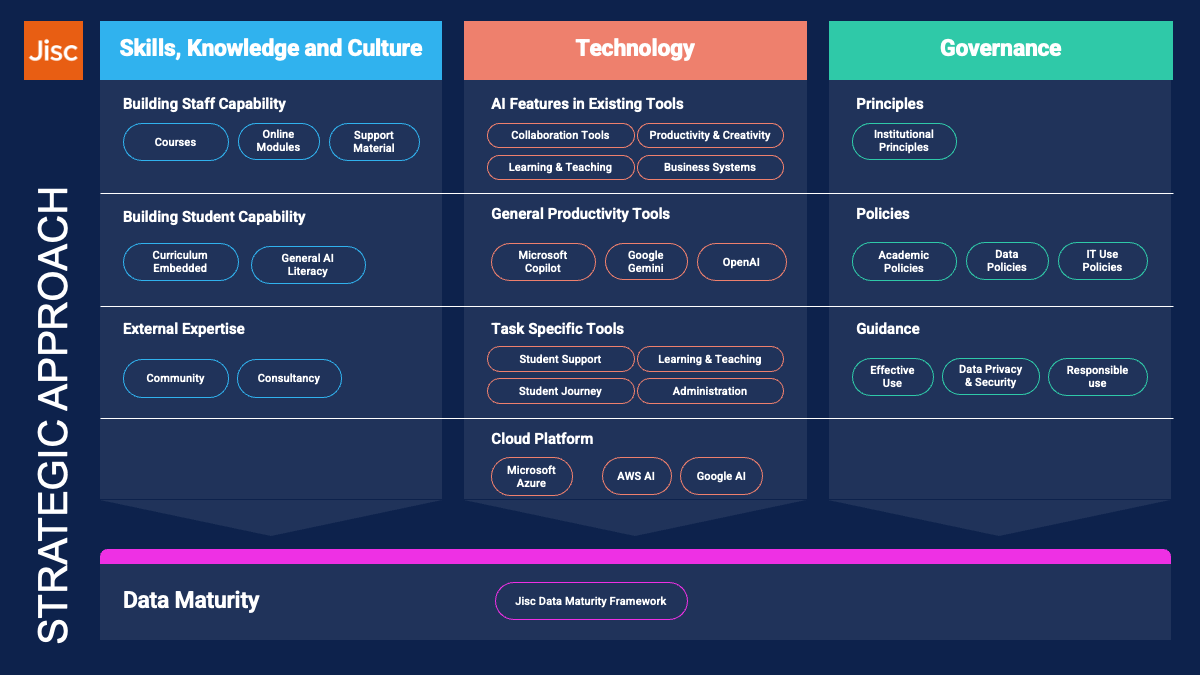
Artificial intelligence is already part of the everyday reality of colleges and universities, shaping how students learn, how staff work, and how institutions operate. Across the board, we see institutions moving along our AI maturity model towards embedding AI. That makes leadership and strategy essential. We are working on a new framework to help the sector think about AI in the round: skills and knowledge, technology, and governance, all underpinned by data maturity. In this blog, I want to introduce the framework, share the thinking behind it, and get feedback on whether it resonates with you. It’s quite a long blog! If you just want to get an overview, you only need to read to the end of the first section. And if you are more interested in exactly what Jisc has to offer, you can jump straight to the operational examples section.
- Introduction: The Context for Leadership
- Who Should Use This Framework and Why?
- Part 1: The Strategic Framework in Detail
- Strand 1: Skills, Knowledge and Culture
- Strand 2: Technology
- Strand 3: Governance
- Data Maturity: A Foundational Enabler
- Part 2: Operationalising the Framework
- Appendix 1: Summary of Tools
Introduction: The Context for Leadership
AI is moving fast. It is reshaping how we work, how we learn, and how society functions at every level: personal, institutional, and national. In colleges and universities, it is no longer something you can treat as experimental or optional. It is already embedded into the tools we use every day, shaping how students study, how staff deliver services, and how institutions are run.
So, leadership matters more than ever. We can’t just react to the latest developments with quick fixes – things are moving too fast. We need to step back, take a strategic view, and ask: what kind of AI-enabled institution do we want to be? And what do we need to put in place to get there?
In this article, I’m going to walk through our framework, starting with a general overview, perhaps useful if you are responsible for setting strategic direction, and then I’ll end by talking about the work we’ve been doing that should help you operationalise the framework – recommended tools, case studies, deep dives into more complex areas and so on.
To get us started, it’s perhaps helpful to think through some of our core challenges:
- Helping staff and students build confidence without losing sight of the fundamentals: subject expertise, critical thinking, and pedagogy.
- Embedding AI across the digital estate in ways that are sustainable and secure, avoiding a patchwork of tools that are hard to maintain or risky to use. In-house, self-built tools are a particular pitfall here.
- Making strategy and policy choices grounded in risk and value, not assumptions or fear.
If we simplify this further, it comes down to three dimensions:
- Skills and Knowledge
- Technology
- Governance
And underpinning all of them is a foundation of data maturity. Together, we can use this to give us a framework for embedding AI safely, effectively, and sustainably.
Who Should Use This Framework and Why?
We’ve designed this framework for anyone in a college or university who’s thinking about how to make AI work in practice.
- Senior leaders and governors: If you’re setting the strategic direction for your institution, this framework will help align AI adoption with your mission and values, and give you a structure for making decisions that stick.
- Digital, IT, and AI leads: If you’re responsible for planning, coordinating, or operationalising AI initiatives across teaching, learning, research, or operations, this framework gives a way to see the bigger picture and avoid piecemeal approaches.
- Teaching and professional services staff: If you want to understand how AI might impact your role, what skills you’ll need, or how to use AI responsibly, our practical guidance and examples should prove helpful.
- Policy-makers and governance teams: If you’re reviewing or updating policies, this framework will help ensure your approach to AI is safe, ethical, and effective, without creating unnecessary complexity.
- Community and external partners: If you’re working with others across the sector, this framework gives a shared language and structure for collaboration.
Why use it? Because it helps your institution move beyond quick fixes, manage risks, and build confidence across your institution. It’s about giving you a shared structure and language for planning, learning, and collaborating wherever you are on your AI journey.
Part 1: The Strategic Framework in Detail
We’ve intended for this framework to be used as a foundation for planning, collaboration, and action. It is not about laying down one-size-fits-all answers, but it is about thinking across your institution and making sure you’ve considered all the key areas.
This section covers the three strands of the framework:
Strand 1: Skills, Knowledge and Culture
AI capability begins with people. Technology changes constantly, but what lasts are the foundational digital literacy skills that give staff and students the confidence to develop their own path.
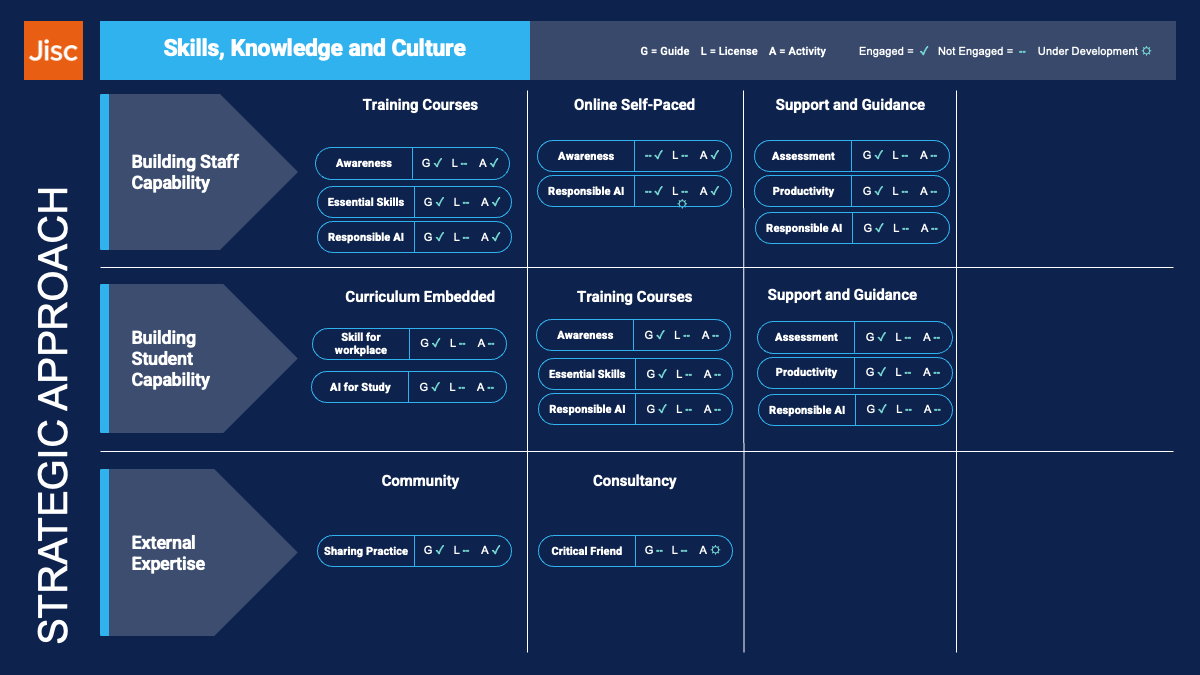
We’ve broken this down into three strands: staff, students, and external expertise.
Building Staff Capability
Every member of staff, whether academic or professional services, should have access to practical, role-specific AI training. This is not just about “how to use the tools.” It is about understanding what is appropriate in a role, what the legal and ethical implications are, and how to judge the effectiveness of potential AI use.
We see three aspects here: building awareness, learning how AI can be applied in specific jobs, and developing the ability to use it effectively and responsibly. Because staff are starting from very different points, the approach needs to be flexible: structured programmes for some, self-paced material for others, and guidance for those who want to go further.
We need to understand that people are at very different places in their journey, and whilst some staff will be at the beginning and need full training sessions, others will be much further along. They’ll still need guidance on your institution’s specific approach, but that can be through support material or self-paced training.
The challenge is making sure no one is left behind, while still enabling those ready to experiment and lead.
Building Student Capability
We think the starting point on this must be to listen to the student voice. My colleague Sue Attewell leads our work on this area – you can read her latest update on student perceptions of AI here. Students are already asking important questions about AI: how to use it responsibly, how it will affect their studies, and what it will mean for their careers. Institutions need to help them use AI not just skilfully but responsibly.
There’s a particular point on this that I feel quite passionate about. Skills for an AI-shaped economy are not the same as “AI skills.” Today’s tools will change, maybe disappear, and will almost certainly become invisible as we move more to automation. What will matter in the long run is deep subject knowledge, originality, and human skills. Those need to stay at the centre.
As for staff, students are at very different stages in their AI journey. So, make sure there are a range of options. All students should have access to general AI training if they need it, in the same way they do other study skills, but this should be supplemented with institution-specific guidance.
AI should be embedded in the curriculum in the same way as any other course-specific digital skills are, and this, of course, will vary enormously between disciplines. But be mindful not to prioritise AI skills above core subject expertise. Consider what needs to be taught or learnt without AI as much as what needs to be taught or learnt with it. Michael Veale and colleagues work at UCL is a great example of how to think about this.
External Expertise
No institution has to do this on its own. The education sector has always been great at collaboration, and the pace of change of AI makes this even more important. Collaborate with trusted partners, join sector networks, and build on shared experience. Reinventing the wheel wastes time we do not have.
Think about when you need to bring in external expertise, but do this carefully! There’s no doubt that the explosion in demand for AI expertise has led to an explosion of ‘AI experts’, some genuinely bringing in deep expertise, others, jumping on the bandwagon. It’s a challenge because generative AI is so new that nobody has direct experience of sustained institutional deployment. But there’s much to learn from other technology waves, and many experts have been thinking deeply about AI in education for a long time, as well as the impact of AI on society.
Any list I make is bound to leave people out, but as examples I would point to Rose Luckin and Wayne Holmes, who have been exploring AI in education and its ethical implications for many years; Dame Wendy Hall and Sana Khareghani whose leadership in AI policy provides essential insight into the wider societal context; and critical voices such as Ben Williamson, who interrogates the social and political dimensions of AI in education and reminds us that these technologies are never neutral.
Strand 2: Technology
How do we create a strategic approach to AI technology? Should we attempt to keep up with all the latest developments? There’s no doubt this is, for many of us, very tempting. With so many fascinating, and often, quite astonishing AI tools being released on a weekly basis, it’s difficult to focus attention. But AI is moving so quickly that this is a race we can’t hope to win. It must be strategic, sustainable, coherent, and aligned with institutional goals.
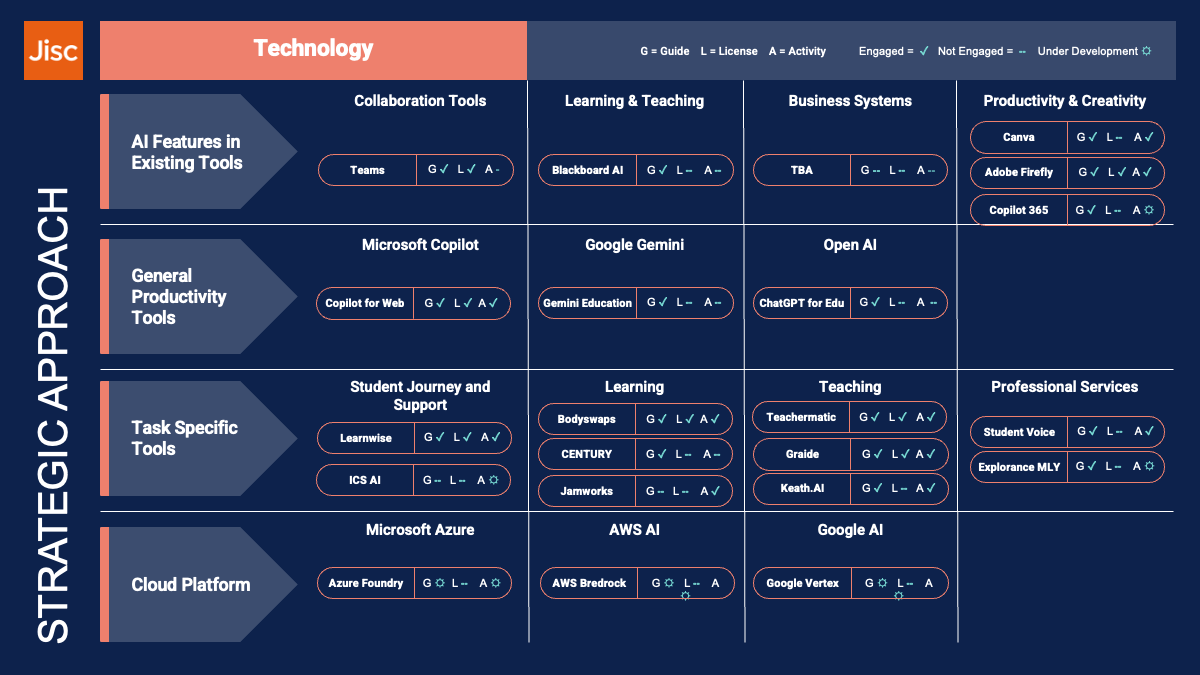
One way of looking at this is breaking the technology landscape into four categories: AI features in existing tools, general-purpose AI tools, task-specific tools, and what is available from cloud providers, especially as part of our existing subscriptions.
Before we go into the detail, there’s one thing I want to stress. Something that shouldn’t be controversial but often seems to be: partner rather than build. This is the approach we take at Jisc, and I strongly believe colleges and universities should do the same.
In the past, it was common for educational institutions to develop their own tools. I’ve done this many times myself in previous roles working in HE. But the world has moved on. Technology has become more complex, and user needs are more sophisticated. Cyber threats are becoming more complex all the time. Universities and colleges have rightly shifted away from in-house tool building.
With AI, however, there seems to be a resurgence of the idea that institutions should develop their own solutions. Often, this probably points to IT governance frameworks and approaches that aren’t yet fully mature, so think very carefully before going down this path!
In-house solutions are tempting, but risky and often, when all costs are considered, expensive. Building secure, robust, accessible applications with a good user experience is tough at the best of times. In AI it is a moving target. I have seen too many cases over the years where in-house development has led to technical debt. Why take on that burden when trusted providers are already delivering?
AI Features in Existing Tools
AI is already embedded in most platforms, and if it’s not, AI features are sure to be heading there soon. We are seeing this ourselves in Jisc, where, for example, our recruitment system offers AI summaries, our research tool offers AI-powered thematic analysis, and we are seeing more AI features in our general tools, such as Microsoft Teams, sometimes at an additional cost, sometimes not. This is the direction of travel for our learning and teaching-focused tools as well, for example, with AI features coming into our VLEs, be it Blackboard, Teams, Google Classroom, Canvas and many others.
In our model, we’ve broken this section down into collaboration tools, learning and teaching, business systems and productivity and creativity. This isn’t a hard and fast rule – it’s one example of how to break them down into more manageable chunks. Do this in a way that makes sense to your organisation based on your structure and responsibilities, as you can’t expect one person or team to understand the whole landscape.
Understanding vendor roadmaps for collaboration tools, VLEs, student systems, finance, HR, and productivity suites is essential if you want to get maximum value and avoid duplication. In addition, it provides a roadmap for what to include in role-specific AI training and guidance.
General Productivity Tools
Major licences from Microsoft and Google already include powerful general-purpose AI tools – Copilot Web and Gemini. Their potential should not be underestimated. And yes, it is worth exploring other general-purpose options like ChatGPT, but my advice would be to start by making the most of what you already have.
It’s worth noting that there has been a degree of confusion in this space, mostly caused by Microsoft’s slightly clumsy marketing and naming of their various AI tools. A key requirement of a general productivity tool is that it keeps your data safe and secure and can handle a wide range of general tasks. In the Microsoft world, this is taken care of through Microsoft Copilot for Web, included in your existing licence. Microsoft Copilot for Microsoft 365 (the one available at significant extra costs) fits more into the previous category – AI features built into your existing Office suite, and is a requirement for providing secure general AI access.
So, make the most of the general productivity tools that you are already providing for your staff and students, and help them gain the skills they need to use them, as described in the previous section.
Task-Specific Tools
There is still a role for specialist AI tools, but you need to start with the problem, not the product. Be clear about what issue you are solving, and what success looks like. Shared pilots across institutions are one of the best ways to see what really works.
Over the last five years, my colleagues at Jisc and I have tested a range of tools with institutions, from marking to tutoring and feedback, and we’ve piloted the best matches in many institutions. The best can be incredibly impactful, saving time, or enabling new ways of learning, teaching or running our institutions.
Again, in this model we’ve broken this section down into different categories – we’ve chosen student journey and support, learning and teaching, research administration and professional services, based on common challenges areas. But do this in a way that makes sense for your organisation.
Understand what your most pressing issues are. If it looks like AI might help you solve them, first check your vendor roadmaps, and look to see if a general-purpose tool might help. If not, this might be the time to start looking to the market for a more specialist solution.
Cloud Platforms
Cloud providers like Microsoft and Google provide a broad range of tools that you can use to solve your institution’s specific issues. Features like Microsoft PowerApps or Google’s equivalents allow you to create AI solutions for your institution without resorting to coding.
For example, it’s simple to create a workflow that reads invoices and then triggers the next stage in a workflow. You should of course use this approach wisely. Overuse can lead to similar challenges to DIY-coded solutions. But used wisely, without duplicating features already available, for example, these tools can be powerful.
Again, as for tasks-specific tools, focus on the most pressing problems, otherwise, it’s easy to get drawn into creating an AI solution just because it’s possible, not because the return on investment makes it worthwhile.
Strand 3: Governance
We all know that governance is a balance – it is about making sure AI adoption is safe, purposeful, and aligned with your mission, while still leaving room for innovation. It’s also an enabler – we hear time and time again, staff and students and students say they avoid using AI for tasks, just because they aren’t actually sure it’s allowed.
Institutional Principles
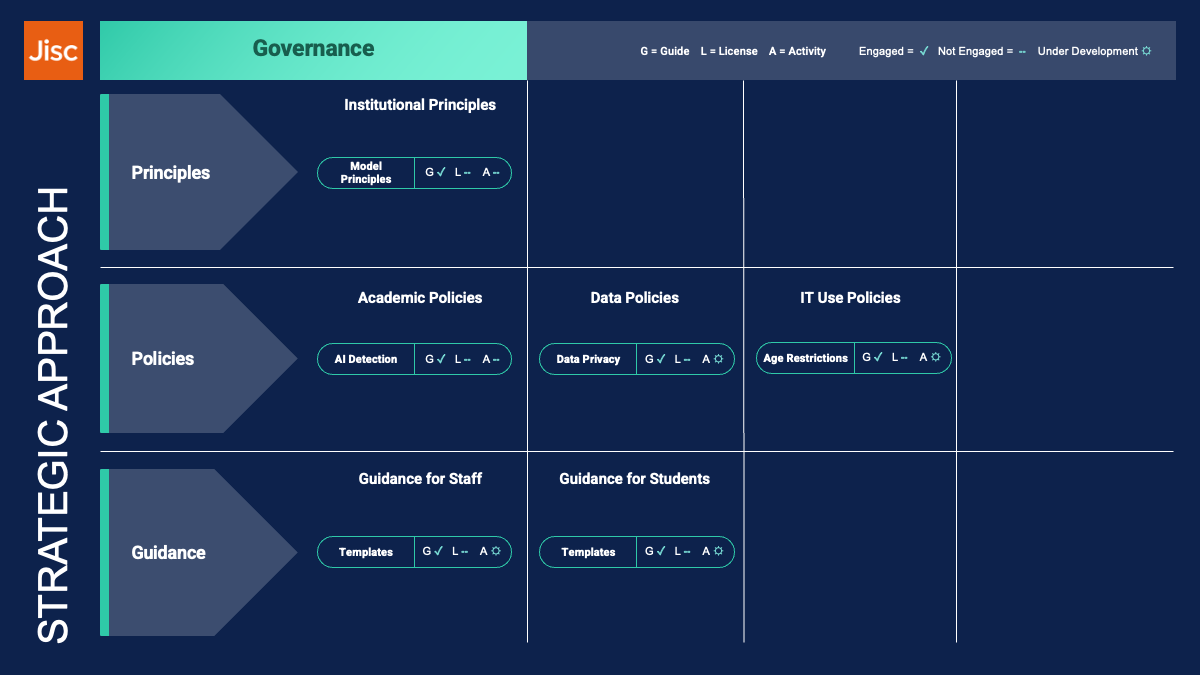
We’d always advise that the starting point is to establish general principles for your institution’s approach to AI. These need to be clear and visible, and above all, aligned to your institution’s mission and values. They should emphasise responsible use, transparency, and inclusion. They give everyone a shared foundation for decision-making.
Policies
I used to get asked a lot whether Jisc could share a “template AI policy.” We have always been clear that this is the wrong approach, and instead recommend reviewing and updating existing policies, not creating new ones. Why? Because most of the core issues with AI are the same as with any other IT tool, and you will already have policies that cover them. If you add a separate AI policy, staff and students first have to work out whether a feature counts as AI, and then which policy applies. From an administrative perspective, it also creates a burden, as you now have to keep overlapping policies aligned.
So, policies need updating. Assessment, IT use, data management, and academic integrity all have to reflect AI realities. The goal is not heavy-handed regulation, but clarity and practicality.
An over-cautious approach carries risks too. If we treat AI too cautiously, students miss out on the very skills they will need in their careers, and staff miss potential efficiency gains.
The exact policies that need to be reviewed will vary between institutions, as each will have its own approach to policy development, and its own set of policies. Broadly, policies to review will include:
- Academic policies, particularly around assessment and AI use
- Data policies, covering protection and management
- IT use policies, including misuse and approved applications
Guidance
Guidance appears twice in this framework, once under skills, knowledge and culture and again here, and that is no accident. Staff need both kinds: clear advice on how to use AI effectively and responsibly and help in interpreting policy in practice. Ideally, all of this should sit in one place. The best guidance is practical and approachable. Most staff and students want to do the right thing, so the most effective way to support them is to provide concrete examples, tailored to the specific tools your institution already uses.
For instance, guidance might explain how to use an institutionally provided Copilot to draft an email to a prospective student, so keeping data secure, while making it clear that staff are responsible for checking tone, accuracy, and alignment with institutional policy before sending.
Data Maturity: A Foundational Enabler
My keynote at Data Matters last year was ‘Data: The Lifeblood of AI’. It was a slightly unusual one in that I was asked if I could talk to that specific title. But it’s broadly true. Without strong data practices, most AI systems will not scale or deliver value. Why do I say most, and not all? Well, many GenAI use cases actually don’t rely on good data – for example, if it’s just drafting an email or summarising or proofreading a document. But most automated systems do, and as we move towards automation, good, accurate data is vital.
Data maturity means being able to:
- Understand where data lives and how it flows across systems
- Define and apply policies around ownership, consent, privacy, and ethics
- Make data accessible and actionable
- Build a culture of trust, where data is used at every level of the institution
That is why colleagues developed Jisc’s Data Maturity Framework, a way for institutions to assess where they are and plan improvements. And this matters beyond AI. Data maturity underpins the whole of digital transformation.
Part 2: Operationalising the Framework: How Jisc Can Help
Part of the motivation in developing this model was to explain how Jisc could help. Our AI team has been together now for around five years, and we’ve built up quite a body of work. Five years is a long time in AI terms, but a lot of our earlier work is still relevant. Hopefully, this section will help you navigate it!
As a top-level summary, these are the main things we do:
- Training & Resources: Free and paid courses, self-paced modules, and practical guides for staff and students
- Community & Collaboration: Join our AI communities, attend events, and learn from sector peers
- Licensing & Pilots: Access sector-wide deals and evidence from real-world pilots
- Expert Advice: Get guidance on policy, governance, and practical implementation—plus new consultancy options
We’ll now dive into the details.
Skills, Knowledge and Culture
Building Staff Capability
A great starting point for staff (and students!) is to use Jisc’s building digital capabilities discover tool – this can be used to self-assess digital capabilities, including AI. It identifies strengths and offers opportunities to develop skills further.
As a next step, we’ve developed online courses that cover the essentials — from literacy and practical use of generative AI to the ethical questions that surround it. These are included in your Jisc membership, and staff at member institutions can sign up on our training page. Design and delivery of these is led by my colleague Paddy Shepperd – and we’ve had over 7000 attendees at our various sessions, with fantastic feedback.
For those that need something more personalised, for example as part of a staff development day, we also offer paid in-house training.
For those who want more flexibility, we’ve developed self-paced online modules covering an introduction to AI and AI and Ethics. These are also included in your Jisc membership.
And we’ve also produced a wide range of support materials, often, like our FE AI and Assessment Top Tips, co-developed with our community. I won’t list them all here – you can find them on our blog, but I’ll pick out some recent or popular examples:
Starting with AI fundamentals, our training is the best for people at the start of their journey, but for those that want to keep up-to-date with some of the more technical details, we share our thoughts on the latest developments, including, recently, initial thoughts on GPT-5, and guidance on how to pick the best LLM models for your task, both from my colleague Rebecca Flook.
We’ve written a wide range of articles that go into more detail on day-to-day use of AI, in particular on how it impacts roles in learning and teaching, but increasing on other roles in professional services too.
We can’t escape the impact on those involved in assessment, and this remains a hot topic for us. I recently revised our AI detection advice, particularly because of the risk of AI detection scales. Our FE working group produced an excellent resource – FE AI and Assessment Top Tips.
We are particularly mindful that AI and its use to support accessibility is a key consideration – a strand led by my colleague Helen Nicholson-Benn, who recently explored AI writing tools, and how to navigate the intersection of AI, accessibility and education.
As mentioned, we are now starting to focus more on professional services, and our legal team recently shared their experience in using AI, something I want us to do more, as sharing practical examples from different areas is going to be one of the best ways of accelerating expertise in very diverse professional services.
We look quite broadly at the issues surrounding our third strand – responsible and ethical use. Yes, the practical, legal side is crucial, for example which tools can be used by learners under 18, but so is an understanding of the impact on society, for example environmental impact and social inclusion – an area led by my colleague Tom Moule. Similarly my colleague Manya Sikombe explored the relationship between diversity and bias – an area that’s always been crucial but given the current climate, is of even more concern.
Building Student Capability
As for staff, Jisc’s building digital capabilities discover tool is a great starting point for students to help them understand their development needs.
Whilst we don’t provide training or resources directly to students, we do provide examples that can be used to help you develop your own resources, as well as providing examples of workplace skills.
Our Learner Resources on Generative AI for Further Education, developed with our FE community, provide a wide range of resources, focusing on introducing AI, using it responsibly, and using it to support your education.
External Expertise
No institution has to do this alone, and our AI communities provide an excellent place to share stories and approaches with colleagues. We have long-standing communities for learning and teaching in FE and HE, and newer ones for FE leaders, professional services and AI in research. Each of these has a JiscMail list and regular meetups. You can sign up on our communities page.
Our higher education community has a discussion-based format, with a ‘lean coffee’ approach to choosing the topics. For example, in July, they discussed Microsoft Teams, AI agents, employability and academic integrity amongst other things, and in June 2025, AI competency frameworks, chatbots and assessment scales.
Our further education community takes more of a presentation-based approach – Helen Nicholson-Benn, who leads these, reflected on the 2024-2025 academic year’s meetups. You can dive into more detail in the monthly write-ups, and the topics are often similar to HE, but perhaps with a different spin. So in April the group heard about assessment scale pilots in colleges.
We are also considering introducing a ‘critical friend’ style consultancy service. Let me know if you are interested in finding out more about this, or in helping us shape it.
Technology
Our core activities in the technology space are piloting AI applications, sharing case studies and examples, and, through our excellent licensing team, creating sector-wide deals. As part of our general scanning work, we look at a lot of different AI tools, and we’ve collected these together in a series of blogs.
I’ll now run through some of the resources we have to support the different technology strands.
AI Features in existing tools
Collaboration tools: Our primary focus in this area has been on Microsoft Teams, and we have a sector wide licensing agreement with Microsoft, available by Chest. We use meeting summary features a lot – you can read about our experience, and also our advice on etiquette for note-taking services.
Learning and teaching tools: Most of our work in this space has been on new, task-specific tools, but we have taken a more detailed look at Blackboard Ultra, including product notes and member stories. We’ve been impressed with the initial information about Canvas’s AI tools and hope to do the same for those.
Productivity and creativity: Most institutions provide a range of general tools to their staff and students. We’ve grouped together productivity – generally Microsoft 365 or Google Workspace, and Creativity, generally Adobe Creative Suite or Canva, and most universities and colleges provide some of these to most, if not all, their staff.
We’ve already mentioned our Microsoft licensing agreement. We also have an agreement with Adobe, and they have been active in our events such as Digifest, where, it’s fair to say, in 2025 their stand was probably the most popular with a mix of fantastic AI tech and free chocolate!
In addition, we have a range of resources to support these tools, many created to support our image generation pilot, which included. Support resources for the tools from Canva and Adobe, alongside general AI image generation tools.
We’ve perhaps been more reserved in our assessment of Microsoft Copilot for 365, especially in the early days. We’re piloting it internally, as are many universities and colleges, so we should have a firmer evidence base on its value soon.
General productivity tools
Our team are regular users of the premium versions of Microsoft Copilot, Google Gemini, OpenAI ChatGPT Team, as well as some use of Claude. We try to support each of these equally – they all have different strengths and weaknesses.
Data Security is understandably the primary concern of many. Microsoft, in particular, made this complicated by incrementally upgrading its approach. You can read how this ended with robust protections in our update.
Understanding the implications of updates to the technology is a challenge, and we try and help with this, for example explaining the latest GPT 5 update and looking at what the latest image features mean for security.
These tools form the foundation of our training webinars – always backed up by practical examples. As well as these, we provide guides to help people get started, for example with Copilot and Gemini.
Task Specific Tools
We’ve been running our AI pilots for 5 years now, building up evidence on what works, backed by practical examples and experience. These have largely, but not exclusively, focused learning and teaching.
Student journey and student support: One of our recent, and very successful pilots, looked at LearnWise, a general-purpose chatbot that could provide support to students across all stages of their journey, and, in some pilots, did the same for staff. You can read our LearnWise pilot final report. We also have a sector-wide licence agreement, available via Chest.
In the learning (or student-facing) space, one of our very first pilots was with Bodyswaps, a VR/AI tool for developing soft skills, and now available via our license subscriptions manager. With Anywyse, we looked at AI-generated audio resources, and we also piloted FeedbackFruits (available by Chest) – a tool to help students by providing feedback on their writing. Our CENTURY case study explores how the tool has helped many students with English and maths. A Jamworks pilot, a tool to help students create their own resources from video content was also a success, especially to support students with additional needs.
In terms of tools to support teachers, perhaps the biggest success, by adoption, has been TeacherMatic in colleges. Our pilot showed it really did save time, as well as show potential for HE and we’re revisiting it to see how it helps with marking and feedback. TeacherMatic is now available via Chest. Graide, similarly, showed potential in our first STEM pilots. As technology and institutional maturity has moved forward, we’re revisiting Graide in our latest marking pilots, to be joined by TeacherMatic.
Finally, we’ve looked at a small number of products in the professional services space – something I expect to expand. Both were in the area data analysis, especially of student feedback data, including a pilot of Student Voice and a product note on Explorance MLY.
Cloud Platforms
We’re just at the beginning of our journey on how to explore cloud platforms, and we know some of our members are beginning to do the same. For example you can read about how City College Plymouth used Google AppSheet to streamline lesson observations.
More generally, Jisc can provide services for both AWS and Microsoft platforms.
Governance
The governance dimension is about making sure AI adoption is safe, responsible, and aligned with your mission.
As I’ve said earlier, we recommend starting with principles. We’ve developed principles, such as the Principles for the use of AI in FE colleges. Our guide ‘Generative AI for College and University Governors’ provides further context to help develop your approach.
On the policy side, our advice has been consistent: don’t create new “AI policies” in isolation but update existing ones so they remain clear and coherent. We provide guidance on areas like AI detection and assessment, data security, data protection, and navigating terms and conditions.
In terms of practical guidance, for universities, we’ve pulled together examples from members to serve as inspiration, and for colleges we’ve created examples aimed at staff and students.
And finally…
I hope that this general tour through our thinking around a framework for AI adoption has been helpful. I think we all understand that AI isn’t something on the horizon for colleges and universities—it’s already here, woven into the way we teach, learn, and run our institutions. That’s why we need to move beyond quick fixes and take a step back to think strategically. The framework I’ve shared is designed to help us do just that: to look at skills, technology, and governance together, with data maturity as the foundation.
So, as you reflect on your own institution’s journey with AI, I hope this framework gives you a starting point. Let’s keep the conversation going. Share your feedback, your challenges, and your successes. The aim is to make this a living document, updated as more evidence arises and technology processes.
Appendix 1: A Summary of Tools mentioned
| Tool/Application | Category | Pilot Report / Case Study | Licence Agreement / Further Info |
| Adobe Creative Suite / Firefly | Creativity | Adobe Firefly intro | Chest Adobe agreement |
| Anywyse | Student Journey/Support | Anywyse pilot | — |
| Blackboard Ultra | Learning & Teaching | Product notes, Member stories | — |
| Bodyswaps | Student Journey/Support | Bodyswaps pilot | Licence subscriptions manager |
| Canva | Creativity | Canva intro | — |
| CENTURY | Student Journey/Support | CENTURY case study | — |
| Explorance MLY | Professional Services | Product note | — |
| FeedbackFruits | Student Journey/Support | FeedbackFruits pilot report | Chest FeedbackFruits agreement |
| Google AppSheet | Cloud Platform | City College Plymouth case study | — |
| Google Gemini | General Productivity | Gemini guide | — |
| Graide | Teacher Support | Graide pilot overview, Latest pilot | — |
| Jamworks | Student Journey/Support | Jamworks pilot report | — |
| LearnWise | Student Journey/Support | LearnWise pilot report | Chest Learnwise agreement |
| Microsoft 365 | Productivity | — | Chest Microsoft agreement |
| Microsoft Copilot (Web/365) | General Productivity | Copilot guide, Initial thoughts | Chest Microsoft agreement |
| Microsoft PowerApps | Cloud Platform | — | Jisc cloud services |
| Microsoft Teams | Collaboration/AI Features | Meeting summary experience | Chest Microsoft agreement |
| OpenAI ChatGPT | General Productivity | — | — |
| Student Voice | Professional Services | Student Voice pilot | — |
| TeacherMatic | Teacher Support | Teachermatic FE pilot, | Chest TeacherMatic Agreement |
Change log:
3rd Sept: BDC Discovery Tool added.
Find out more by visiting our Artificial Intelligence page to view publications and resources, join us for events and discover what AI has to offer through our range of interactive online demos.
For regular updates from the team sign up to our mailing list.
Get in touch with the team directly at AI@jisc.ac.uk